Primark Receipt Generator
Create a Primark UK fashion and clothing till receipt with itemised apparel lines, barcode numbers, and 20% VAT summary. Export a clean PDF in minutes.
Create a Primark-style till receipt with fashion items, accessories, return policy details, 20% VAT breakdown, and payment details. Download a printable PDF.

Choose
Primark Receipt selected

Customize
Fill in your details

Download
Save or share receipt
Edit the details once and the preview updates instantly.
Quick summary
Primark receipt template overview
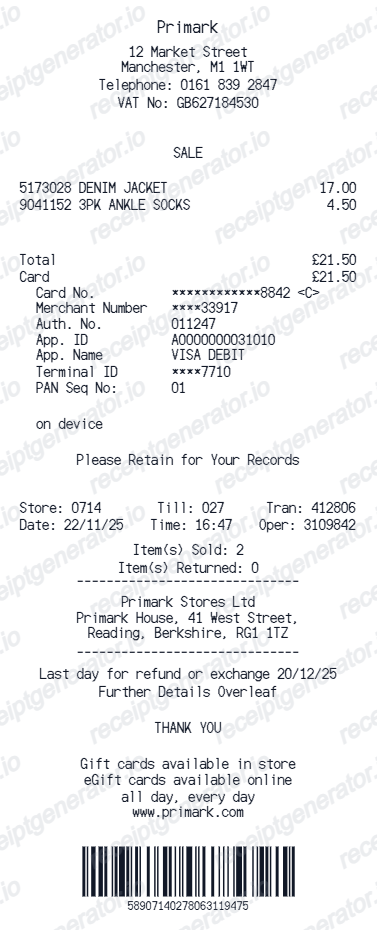
Use this Primark-style receipt template to build a compact United Kingdom receipt with editable clothing items, barcode numbers, 20% VAT, and return policy details.
What Is on a Real Primark Receipt?
Primark receipts are only ever generated in a physical store - Primark does not sell online or ship orders anywhere in the world - so the till receipt is the sole proof of purchase for every transaction.
No online sales anywhere
Primark has never operated online checkout or home delivery in any of its markets. Its website lets shoppers check stock at a nearby store, but every purchase happens at a physical till, which is why a Primark receipt always shows a store location rather than an order number.
No loyalty or rewards program
Unlike most large clothing retailers, Primark does not run a points, cashback, or membership rewards program, so its receipts never show a loyalty balance or member tier - just the transaction details.
Receipt required for any refund
Primark will not process a refund without the original till receipt. Items without a receipt can sometimes be exchanged or given store credit at the till's discretion if still tagged and saleable, but a cash refund needs the receipt.
28-day return window from the till date
Returns and exchanges must happen within 28 days of purchase, with tags attached and the item unworn - the date and time printed on the receipt is what this window is measured against.
VAT rate varies by country
Because Primark trades across the UK, Ireland, and mainland Europe, the tax shown on the receipt follows the local rate - 20% VAT in the UK, 23% VAT in Ireland, and the applicable rate in other EU countries - rather than one fixed figure.
Store number and till number in the header
Each receipt prints a store number, till (register) number, and the transaction date and time, which staff use to trace a sale if a customer needs to confirm a purchase.
Create a print-ready Primark retail receipt
Edit the layout, watch it update live, then print, download PDF, or email.
Live Primark receipt preview
See the Primark receipt update instantly as you edit items, totals, VAT, and messages.
PDF download
Export a clean Primark-style receipt PDF for digital or printed records.
Mobile-friendly editor
Create and edit Primark receipts from desktop, tablet, or phone.
Rewards and VAT support
Customise loyalty text, VAT totals, barcode digits, and footer messaging.
Get Your Original Primark Receipt First
Because Primark does not sell online or keep a linked purchase-history account, the till receipt from the physical store is the only original record - there is no app or website order history to check. If the item is still tagged and saleable, staff may offer an exchange or store credit without it. Use this template when the original is unavailable - a faded or lost paper receipt from an in-store purchase.
Budget tracking
Keep a clear itemised record of Primark clothing, accessories, and homeware spending.
Lost receipt replacement
Recreate a Primark clothing till slip for 28-day returns or personal bookkeeping from confirmed purchase details.
VAT expense documentation
Prepare a clothing retail receipt record with 20% VAT (and 0% kids clothing where applicable) for bookkeeping.
Primark Receipt Formats
Choose the Primark-style format that best matches your clothing and expense recordkeeping needs.
Standard Fashion & Clothing Till Slip
A Primark-style receipt with itemised apparel lines, barcode numbers, store location, and payment details.
28-Day Store Return Receipt
A Primark receipt layout with 28-day return policy terms, till timestamp, and transaction barcode.
UK 20% Retail VAT Receipt
A Primark-style receipt configured with GBP (£) currency and 20% standard VAT breakdown (with 0% kids clothing where appropriate).
More free receipt templates for United Kingdom retail shopping and retail expense records.
More United Kingdom Receipt Templates
Browse our collection of receipt templates for various purposes.
Primark Receipt FAQ
Common questions about creating Primark retail receipts for personal records, budgeting, and VAT documentation in United Kingdom.
Choose the Primark receipt template, edit the store header, add items and prices, set the total and VAT, then download the receipt as a PDF.
Yes. Store name, items, prices, rewards, barcode digits, and footer text are all editable in the builder.
Yes. You can create and preview Primark receipts for free. Watermark-free PDF downloads are available with paid plans.
There is no way to retrieve a Primark receipt after the fact - Primark does not sell online, does not offer emailed receipts, and does not keep a linked purchase-history account. The till receipt handed to you in-store is the only original copy, so it's worth photographing it immediately after purchase.
Primark will not issue a cash refund without the original receipt. If the item still has its tags attached and is in saleable condition, staff may offer an exchange or store credit at their discretion, but this isn't guaranteed.
Yes. The totals section includes a VAT-inclusive total to match the format on United Kingdom Primark receipts.
Yes. The Primark receipt template is configured with the £ symbol and VAT-style United Kingdom receipt details.
Yes. After editing the details, preview and download the Primark-style receipt as a clean PDF for records or budgeting.
A real Primark receipt shows the store number, till number, and transaction date and time at the top, followed by each item and its price, the VAT rate applied for that country, the total paid, and the payment method - with no loyalty points or member details anywhere on it.
Receipt Generator · Receipt Maker · 300+ Free Templates
Create your Primark receipt
Use the editable Primark receipt generator to add items, VAT totals, loyalty text, and barcode details, then export a clean PDF.