Rent Receipt Generator
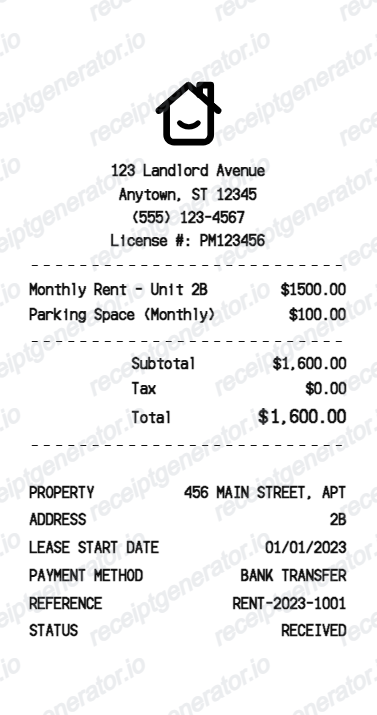
Create a rent receipt with landlord details, monthly rent charges, subtotal, tax, total, property address, lease date, payment method, reference, and status.
Create a rent receipt with editable landlord contact details, rent and parking charges, totals, property address, payment method, reference, and status.

Choose
Rent Receipt selected

Customize
Fill in your details

Download
Save or share receipt
Edit the details once and the preview updates instantly.
Quick summary
Rent receipt template overview
Create a rent receipt with landlord details, monthly rent charges, subtotal, tax, total, property address, lease date, payment method, reference, and status.
What Is on a Real Rent Receipt?
A rent receipt is more than a payment confirmation - for landlords it is a piece of tax documentation, and for tenants it is proof of an on-time payment history.
Landlord and tenant information
A complete rent receipt names both parties - landlord (or property manager) and tenant - along with the property address and, for multi-unit buildings, the specific unit number.
Rental period covered, not just the payment date
The receipt states which month (or date range) the payment covers, separate from the date the payment was actually made - important when rent is paid early, late, or split across partial payments.
Payment method on record
Whether paid by check, cash, bank transfer, or a payment app, the method is noted on the receipt - cash payments especially need this documentation since they leave no bank trail otherwise.
IRS Schedule E documentation for landlords
Landlords report rental income on Schedule E (Form 1040), which covers rent received plus related income like late fees or retained deposits. The IRS requires documentary evidence - receipts, canceled checks, or bank records - to support that income if a return is audited.
Late fees and additional charges itemized
When a payment includes a late fee, parking charge, or other add-on, a real receipt itemizes it separately from base rent rather than folding it into one total - both for tenant clarity and for accurate landlord recordkeeping.
Running balance or payment status
Many rent receipts note whether the payment was paid in full, partial, or brings the tenant current, which matters for both parties if a dispute over rent owed comes up later.
Create a print-ready rent receipt
Edit the layout, watch it update live, then print, download PDF, or email.
Live rent receipt preview
Watch the receipt update as you edit landlord details, rent charges, totals, and payment fields.
Editable thermal receipt layout
Use a compact receipt format with dashed divider lines, charge rows, totals, and property details.
Download as PDF
Export a clean rent receipt PDF for records, examples, or rental payment documentation.
Mobile-friendly editor
Create and edit rent receipts from desktop, tablet, or phone.
Get Your Original Rent Receipt First
If you already paid rent, the original is always better: check your property management portal (many, like AppFolio or RentCafe, generate payment confirmations automatically), your bank or payment app's transaction history, or ask your landlord directly for a signed receipt. Use this template when the original is unavailable - an informal cash arrangement, a landlord who doesn't issue receipts, or a payment history you need to rebuild for tax or rental-application purposes.
Tenant payment records
Create a rent receipt for monthly rental payment documentation.
Landlord bookkeeping
Generate consistent rent receipts for tenant records and property management files.
Receipt mockups
Use the rent receipt format for demos, training, examples, or UI mockups.
Rent Receipt Template Types
Create rent receipts for monthly payments, apartment records, property management examples, and rental payment documentation.
Monthly rent receipt
A receipt for monthly rent payments with itemized charges and total paid.
Apartment rent receipt
A rental receipt with unit number, property address, payment reference, and status.
Property management receipt
A compact property management receipt for rent, parking, and rental payment records.
Related Guides
Explore related guides to understand the receipt details, lookup steps, and documentation workflows.
Receipt guide
Repair Receipt for Insurance Claims
See which service and payment fields make a repair or service record easier to review.
Explore Repair Receipt for Insurance ClaimsEditable template
Repair Receipt template
Explore this editable receipt layout and its fields before opening the editor.
Explore Repair Receipt templateMore free receipt templates for service and retail expense records.




Rent Receipt FAQ
Common questions about creating, editing, and downloading a rent receipt.
Open the rent receipt generator, edit landlord details, rent charges, totals, property address, payment method, reference, and status, then preview and download as a PDF.
Yes. The receipt includes editable property address, lease start date, payment method, reference, and status fields.
Check your property management portal if your landlord uses one - platforms like AppFolio, RentCafe, or Zelle/Venmo typically log a payment confirmation automatically. If you paid by check or cash directly to a landlord, ask them for a signed receipt, or pull the canceled check or bank transfer record as backup documentation.
Requirements vary by state and lease terms - some states require a receipt for cash payments or on tenant request, while others leave it to the lease agreement. Regardless of the legal requirement, receipts protect both sides: tenants get proof of payment, and landlords get organized records to support rental income on Schedule E.
Yes. You can edit line items such as monthly rent, parking space charges, fees, and other rental charges.
Yes. The totals section supports editable subtotal, tax, and total rows.
A real rent receipt shows the landlord and tenant names, the property address and unit number, the rental period the payment covers, the payment date and method, the amount paid (with any late fees or add-ons itemized separately), and the payment status - paid in full, partial, or bringing the account current.
Receipt Generator · Receipt Maker · 300+ Free Templates
Create your Rent receipt
Use the editable Rent receipt generator to add items, tax totals, and payment details, then export a clean PDF.