Free Square Style Receipt Generator
Create Free Square POS-Style Receipts Online - Add Items, Modifiers, Taxes & Tips. Preview free; watermark-free PDF export requires a paid plan.
Create a Square-style receipt with item modifiers, tip, taxes, and payment details. Download a PDF for POS billing or retail records.

Choose
Square Style Receipt selected

Customize
Fill in your details

Download
Save or share receipt
Edit the details once and the preview updates instantly.
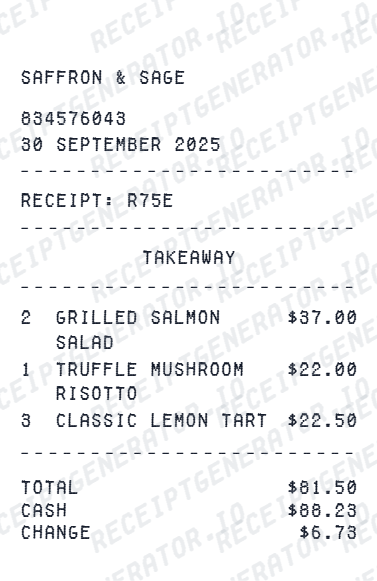
Quick summary
Square Style receipt template overview
Create Square POS-Style Receipts Online - Add Items, Modifiers, Taxes & Tips. Preview the layout before choosing a PDF export plan.
What Is on a Real Square POS Receipt?
Square powers point-of-sale checkout for a huge range of small businesses, so its digital and printed receipts follow a consistent structure across very different storefronts. A credible recreation should match that structure field for field.
Digital receipts sent by text or email
The first time a card is used with a Square seller, checkout prompts for an email or phone number. Provide an email and future receipts arrive automatically; provide a phone number and you choose to receive a text receipt after each payment - Square does not require an account for either.
squareup.com/receipt lookup for any cardholder
Square runs a public receipt lookup tool where a customer enters their card's last 4 digits plus the approximate date and amount to find a matching transaction, or searches by email at receipts.squareup.com with a one-time verification code - no merchant contact required for receipts up to 24 months old.
Modifiers nested under each item
Square's line-item format prints modifiers (size, temperature, add-ons, special requests) as an indented sub-line directly under the parent item, rather than folding them into the item name - a layout choice that distinguishes Square receipts from older POS formats.
Tip as its own line, added after tax
When a Square terminal or Square Register prompts for a tip, the tip amount prints as a separate line below tax, and the total updates to include it - useful for anyone reconciling why a Square charge is higher than the item subtotal.
Statement descriptor can differ from the storefront name
Square sellers can configure a custom statement descriptor for card statements, which sometimes differs from the DBA name printed on the receipt or shown at the register - a common source of 'what did I buy' confusion that receipt lookup resolves.
Transaction reference and payment method
Every Square receipt carries a transaction ID or reference number, the payment method (card brand and last 4, cash, or Square Pay/digital wallet), and the date and time of sale - the details a Square seller's dashboard uses to locate the original charge.
Print-ready Square POS-style receipts
Edit the layout, watch it update live, then print, download PDF, or email.
Live Square receipt preview
Watch the receipt update as you add items and modifiers.
One-click print
Print your Square-style receipt from the browser.
Download as PDF
Export a clean Square POS receipt PDF.
Mobile-friendly editor
Create Square receipts from any device.
Get Your Original Square Receipt First
If the purchase is recent, check your email or texts for the digital receipt Square sent automatically, or search squareup.com/receipt with your card's last 4 digits and the approximate date and amount - Square also lets you search by email at receipts.squareup.com with a one-time verification code, covering transactions up to 24 months old with no merchant contact needed. Use this template when the original is unavailable - an expired lookup window, a purchase made with cash, or a business record that needs to be recreated in Square's format.
Small retail store billing
Create Square-style receipts for small retail shop customer billing.
Café & coffee shop receipts
Add item modifiers and tip for café POS receipt documentation.
Service business receipts
Generate Square-style receipts for haircuts, repairs, or services.
Farmer's market vendor receipts
Create Square-style receipts for market vendor transaction records.
Square Style Receipt Types
Choose the Square receipt format for your POS billing.
Square Retail Receipt
Square POS receipt for retail store transactions.
Square Food Service Receipt
Square receipt with item modifiers and tip for café/restaurant.
Square Service Receipt
Square-style receipt for service business customer billing.
Related Guides
Explore related guides to understand the receipt details, lookup steps, and documentation workflows.
More free receipt templates for grocery and retail expense records.




Square Style Receipt FAQ - Square POS Format Documentation
Learn how to create Square POS-style receipts with modifiers, tip, transaction ID, and PDF export for small business billing and expense records.
Choose the Square style receipt template, add business name, items with modifiers, quantity, price, tip, tax, and payment method. Download as PDF matching the Square POS format.
Yes. Add a tip as a percentage or dollar amount - displayed as a separate line matching Square's tip format.
Yes. Add Square transaction ID/reference and card last 4 digits for complete receipt documentation.
Yes. Download a clean PDF matching the Square POS receipt format for customer billing or business expense records.
A real Square receipt shows the merchant's business name and location, item lines with any modifiers (size, add-ons, notes) indented under each product, subtotal, tax, an itemized tip line if one was added at checkout, the payment method with card brand and last 4 digits, and a transaction reference number Square uses internally to match the sale.
Yes. Add item modifiers (e.g., 'Large', 'Extra Shot', 'No Onion') as sub-line items under each product - matching the Square POS receipt format.
Yes. Add card payment, cash, or Square Pay as separate payment lines - matching Square checkout formats.
Yes. Small retail, café, and service businesses using Square POS can document transactions with this Square-style receipt.
Go to squareup.com/receipt (Square's public receipt lookup) and search using the card's last 4 digits plus the approximate transaction date and amount. If you gave your email or phone number at checkout, you can also search by email at receipts.squareup.com - Square sends a one-time verification code before showing matching transactions, and receipts up to 24 months old are retrievable without contacting the merchant.
Square sellers can set a custom 'statement descriptor' separate from their storefront or DBA name, so a card statement sometimes shows the Square seller's legal business name, a shortened version, or even 'SQ *BusinessName' instead of the name printed on the paper receipt. This is one of the most common reasons people search for a lost Square receipt - the charge on their statement does not match what they remember buying.
Receipt Generator · Receipt Maker · 300+ Free Templates
Create your Square Style receipt
Use the editable Square Style receipt generator to add items, tax totals, and payment details, then export a clean PDF.