TJ Maxx Receipt Generator
Create a TJ Maxx-style receipt with store details, clothing and home item rows, discount savings, tax, total, card payment details, and return policy footer. Preview live and export a PDF.
Create a TJ Maxx-style receipt with editable store details, clothing and home item rows, discount savings, subtotal, tax, total, and card payment information. Download a clean PDF for purchase records or expense documentation.

Choose
TJ Maxx Receipt selected

Customize
Fill in your details

Download
Save or share receipt
Edit the details once and the preview updates instantly.
Quick summary
TJ Maxx receipt template overview
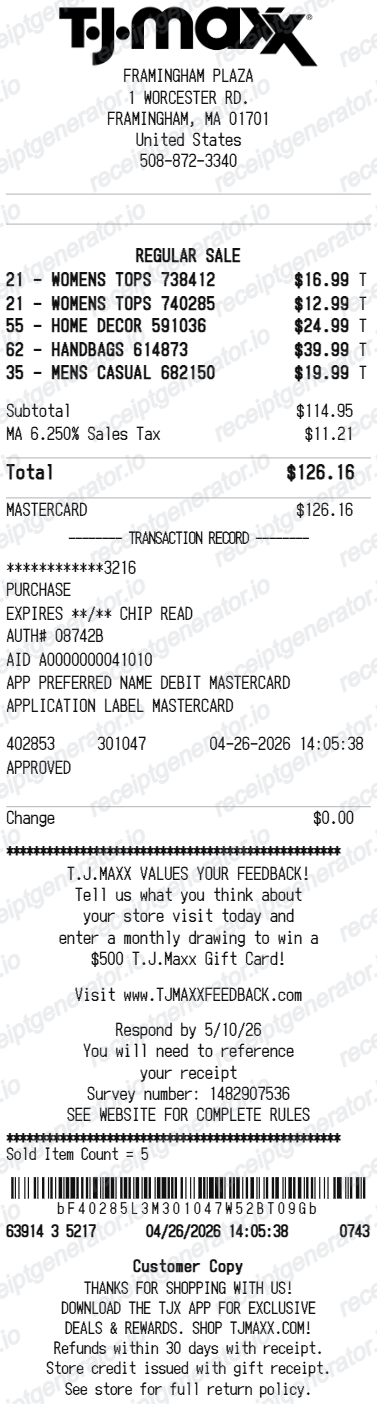
Use this TJ Maxx-style receipt template to build a complete discount retail receipt with store details, clothing and home item rows, compare-at prices, subtotal, tax, card payment details, and return policy footer.
What Is on a Real TJ Maxx Receipt?
TJ Maxx is a TJX brand, and its register receipts carry the same structure the chain relies on at the returns desk. A credible replacement copy should match these fields.
Store, register, and cashier in the header
The top of the receipt pins the transaction to a specific TJ Maxx location - store number, address, and phone - plus the date, time, register, and associate identifiers the returns desk uses to match the receipt to a store.
Item numbers with terse descriptions
Each line prints an item number and an abbreviated department-style description at the price actually paid. The crossed-out compare-at price lives on the price tag, not the receipt - a receipt showing 'original' prices is not how TJ Maxx prints.
The 30-day policy printed in the footer
With the register receipt, merchandise can be returned within 30 days for an exchange or a refund in the original form of tender. Past 30 days, or with a gift receipt, the return becomes merchandise credit. Online tjmaxx.com orders get a longer 40-day return window.
A return barcode the desk actually scans
The receipt carries a barcode and return code that associates scan to validate the original transaction, which is why a faded or damaged thermal receipt complicates a return.
No-receipt returns leave an ID trail
Without a receipt, TJ Maxx issues merchandise credit only and requires a valid government-issued photo ID, name, address, and signature - and the name printed on the credit must match the ID when it is spent.
Card details and approval codes
Card purchases print the card type and last 4 digits with an approval number, and TJX Rewards purchases reflect the store card. A survey invitation with an expiring code typically prints near the footer.
Create a print-ready TJ Maxx receipt
Edit the layout, watch it update live, then print, download PDF, or email.
Live TJ Maxx receipt preview
Watch the receipt update instantly as you edit store details, item rows, price fields, totals, and payment information.
Original vs. sale price editor
Show compare-at retail prices alongside TJ Maxx prices for each clothing or home item.
Download as PDF
Export a clean TJ Maxx-style receipt PDF for purchase records or expense documentation.
Mobile-friendly editor
Create and edit TJ Maxx receipts from desktop, tablet, or phone.
Get Your Original TJ Maxx Receipt First
TJ Maxx register purchases are not tied to an online account, so there is no purchase-history lookup for in-store receipts - check your email for an e-receipt if you selected one at the register, and find tjmaxx.com orders in your online order history or shipping confirmation email. Use this template when the original is unavailable - a lost or faded register slip, or an in-store purchase with no digital copy.
Clothing purchase records
Document a TJ Maxx shopping trip with apparel, accessories, and home item details for personal records.
Lost receipt recovery
Recreate a TJ Maxx receipt when the original was lost, not printed, or needed for a return.
Expense documentation
Prepare a retail receipt for clothing or uniform purchases for work expense reimbursement.
Receipt mockups
Use the TJ Maxx-style layout for demos, training materials, or presentation mockups.
TJ Maxx Receipt Formats
Choose the TJ Maxx-style receipt layout that best matches your clothing, home goods, or discount savings documentation needs.
Clothing Purchase Receipt
A TJ Maxx-style receipt with apparel and accessory item rows, tax, and payment summary.
Home Goods Receipt
A receipt showing home decor, kitchen, and furniture item rows with compare-at prices and totals.
Discount Savings Receipt
A TJ Maxx receipt showing original retail price alongside TJ Maxx price for each item.
Retail Receipt Guides
Read supporting guides for retail receipts, clothing purchase records, and expense documentation.
Retail Receipt for Reimbursement
Learn which retail store receipt details finance teams usually want for reimbursement and how to keep a cleaner purchase record.
Explore Retail Receipt for ReimbursementRetail Receipt for Expense Reports
See which fields a store receipt needs to qualify for expense report or reimbursement submission.
Explore Retail Receipt for Expense ReportsRelated Other Receipt Templates
More free receipt templates for discount retail, clothing stores, and shopping expense records.
TJ Maxx Receipt FAQ
Common questions about creating, editing, and downloading a TJ Maxx-style receipt for purchase records, expense documentation, and receipt examples.
Open the TJ Maxx receipt generator, edit the store details, item rows, discount or savings lines, subtotal, tax, total, card payment details, and return policy footer, then preview and download as a PDF.
Yes. The payment block includes card type, masked card number, approval code, and transaction reference fields.
In-store purchases are not linked to an online account, so there is no register-receipt lookup - if you chose an e-receipt at the register, search your email for the copy; otherwise the paper slip is the only record. Online orders are easier: tjmaxx.com keeps order history, and the shipping confirmation email works as the return receipt.
Yes, but expect merchandise credit rather than a refund. With the register receipt, TJ Maxx refunds to the original form of payment within 30 days. Without a receipt - or past 30 days, or with a gift receipt - you receive merchandise credit at the item's current price, and a valid government-issued photo ID, name, address, and signature are required.
Both. You can use these templates for reimbursements, bookkeeping prep, and internal documentation workflows.
Yes. Each item row supports original retail price and TJ Maxx price fields so you can show the discount savings on each item.
Yes. The receipt footer supports editable text for return policy information, store contact details, and promotional messaging.
A TJ Maxx register receipt shows the store number and address with the date, time, register, and associate details, item lines with item numbers and short descriptions at the price paid, subtotal, tax, and total, card type with approval details on card payments, a return barcode scanned at the returns desk, and the 30-day return policy printed in the footer.
Add the store name, purchase date, line items, totals, tax, payment method, and any optional notes you need on your TJ Maxx template.
This tool creates an editable TJ Maxx style layout for documentation. It is not issued by the original merchant or brand system.
Receipt Generator · Receipt Maker · 300+ Free Templates
Create your TJ Maxx receipt
Use the editable TJ Maxx receipt generator to add clothing and home item rows, original versus sale prices, totals, and payment details, then export a clean PDF for your records.