How to Print a Thermal Receipt from Your Browser
Ready to create your own? Use our free receipt generator — no account needed.
Browse Receipt Templates →On this page
Printing a thermal receipt from your browser is straightforward once your printer is set up correctly. This guide walks through the exact steps for Chrome, Firefox, and Safari — and covers what to do if you don't have a thermal printer.
Quick Answer
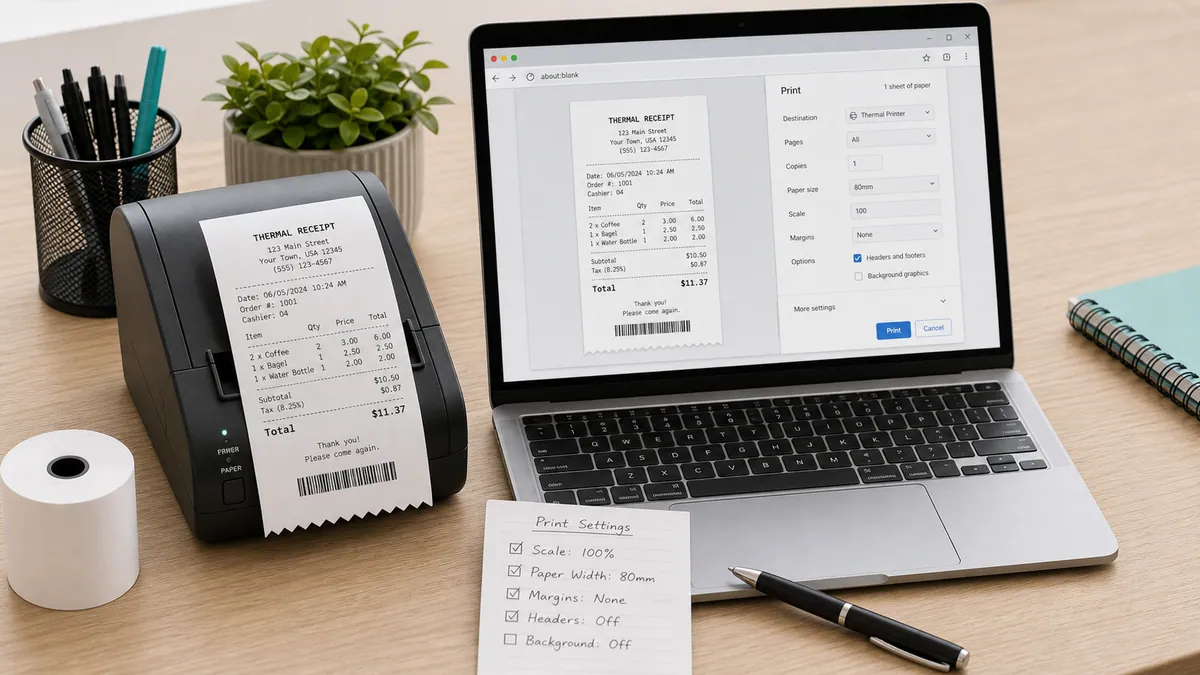
Connect your thermal printer, set the paper size to 80mm roll in print settings, disable headers and footers, then click Print. Total setup time under 2 minutes.
Step 1: Create Your Thermal Receipt
Open the thermal receipt generator, fill in your business name, items, tax, and payment method, and preview the receipt.
→ Open Cafe Thermal Receipt Generator
Step 2: Connect Your Thermal Printer
Make sure your thermal printer is:
- Connected to your computer (USB, Bluetooth, or network)
- Loaded with 80mm thermal paper roll
- Turned on and showing as ready
Common thermal printers for receipts:
| Model | Connection | Price range |
|---|---|---|
| Epson TM-T20III | USB / Ethernet | $200–$300 |
| Epson TM-T88VI | USB / Ethernet / Bluetooth | $300–$450 |
| Star TSP143III | USB / LAN / Bluetooth | $250–$350 |
| Bixolon SRP-350V | USB / Ethernet | $200–$280 |
| MUNBYN ITPP941 | USB / Bluetooth | $80–$120 |
Budget options like the MUNBYN work well for low-volume vendors and market stalls.
Step 3: Open the Print Dialog
Click the Print button in the receipt generator, or press Ctrl+P (Windows) / Cmd+P (Mac) from the preview.
Step 4: Set the Correct Paper Size
This is the most important step. In the print dialog:
Chrome:
- Click More settings
- Under Paper size, select your thermal printer's roll size
- If 80mm is not listed, click Manage custom sizes and add: Width = 80mm, Height = 200mm (or longer for more items)
Firefox:
- Click Properties next to your printer name
- Go to Paper/Quality tab
- Select the 80mm roll paper size
Safari (Mac):
- Click Show Details
- Change Paper Size to your thermal printer's roll size
- If not listed, go to System Preferences → Printers & Scanners → your printer → Options & Supplies to configure
Step 5: Disable Headers and Footers
In Chrome: Under More settings, toggle off Headers and footers
In Firefox: Under Options, uncheck Print headers and footers
In Safari: Uncheck Print headers and footers in the print dialog
This removes the browser's URL and page title from the printed receipt.
Step 6: Print
Click Print — the receipt sends to your thermal printer and prints in seconds.
Printing Without a Thermal Printer
If you don't have a thermal printer:
Option 1 — Download as PDF Download the receipt as PDF and send digitally to the customer by email, WhatsApp, or SMS.
Option 2 — Print on standard paper Print on A4 or Letter paper — the narrow receipt prints centered on the page. Cut to size if needed.
Option 3 — Screenshot Take a screenshot of the receipt preview and share as an image.
Troubleshooting
Receipt prints too wide: The paper size is set to A4 instead of 80mm roll. Change in print settings.
Receipt cuts off at the bottom: The custom paper height is too short. Increase the height value in custom paper size settings.
Printer not found: Check USB or Bluetooth connection and make sure the printer driver is installed.
Output is blank: Thermal paper is loaded upside down — flip the roll and try again. Thermal paper only prints on one side.
Create Your Cafe Thermal Receipt
Build a professional 80mm POS receipt for cafe orders, tax, payment, and loyalty details.
Related Guides
Final Takeaway
Printing a thermal receipt from your browser takes under two minutes once your printer is set up. The key step is setting the correct 80mm paper size in your print dialog — everything else is standard. If you don't have a thermal printer, the PDF download works just as well for digital receipts.
FAQ
Yes. Any browser — Chrome, Firefox, Safari, Edge — can print to a thermal printer connected to your computer.
Set the paper size to 80mm roll in your print settings and disable headers and footers for the cleanest output.
The most common models are the Epson TM-T20, Epson TM-T88, Star TSP100, and Bixolon SRP-350. All print standard 80mm receipts and are widely available.
Yes. Download the receipt as PDF and open in any PDF viewer. Print from the PDF on standard paper or send digitally by email or SMS.