Careem Receipt Generator
Create a Careem-style trip receipt with trip ID, captain and vehicle details, pickup and drop, distance, duration, fare breakdown, and payment in AED. Preview live and download a PDF.
Create a Careem-style trip receipt with trip ID, captain and vehicle, pickup/drop, distance, duration, fare breakdown, and total in AED. Download a PDF for expense records.

Choose
Careem Receipt selected

Customize
Fill in your details

Download
Save or share receipt
Edit the details once and the preview updates instantly.
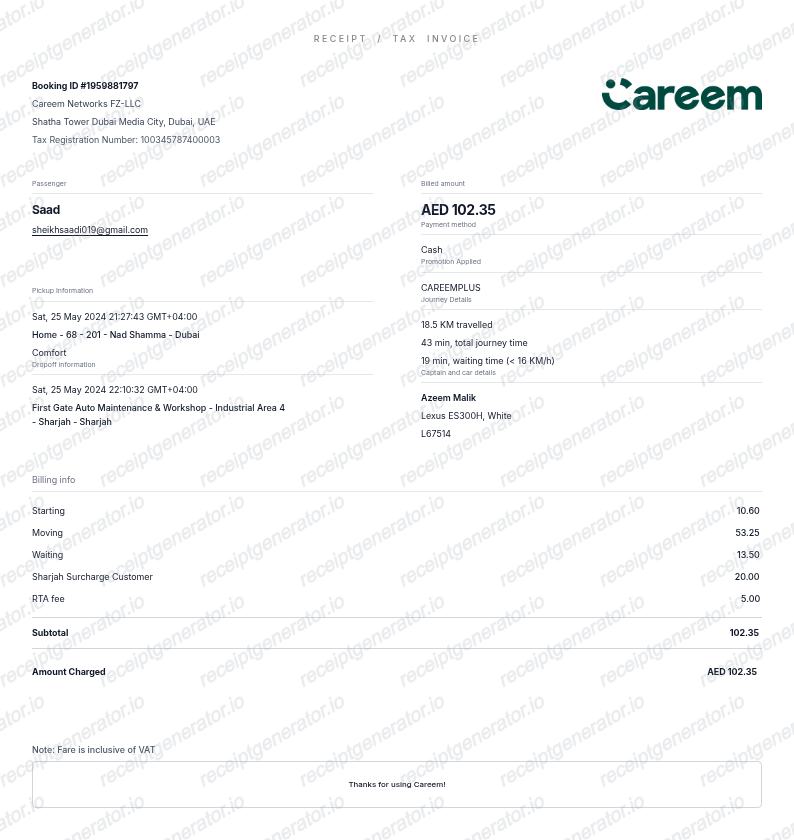
Quick summary
Careem receipt template overview
Create a Careem-style trip receipt with trip ID, captain and vehicle details, pickup and drop, distance, duration, fare breakdown, and payment in AED. Preview live and download a PDF.
What Is on a Real Careem Receipt?
Careem is the leading ride-hailing app across the Middle East and has operated as an Uber subsidiary since Uber's 2019 acquisition, though it still runs under the Careem brand with its own app and receipts.
Emailed automatically after every trip
Careem sends a receipt to the email address on the account right after a ride ends, and it also stays available in the app's trip history for later download.
VAT rate depends on the country
The receipt applies the standard VAT rate for the country the ride took place in - 5% in the UAE and most other GCC markets, and 15% in Saudi Arabia, which raised its standard VAT rate in 2020.
Fare broken down by component
Trip receipts itemize the base fare, distance charge, time charge, and any applicable booking or surge fee, matching the estimate shown before the ride was confirmed.
Captain, vehicle, and trip ID
Each receipt lists the captain's (driver's) name, vehicle details, pickup and drop-off addresses, trip distance and duration, and a unique trip ID used for support and dispute lookups.
Still operates under the Careem app post-acquisition
Even though Uber owns Careem, rides booked through the Careem app generate Careem-branded receipts, not Uber receipts - the two remain separate consumer-facing platforms in the region.
Create a print-ready Careem receipt
Edit the layout, watch it update live, then print, download PDF, or email.
Live Careem receipt preview
Watch the Careem receipt update in real time as you edit item rows, prices, and tax totals.
Print-ready PDF export
Download a clean, high-resolution Careem-style receipt in PDF format for bookkeeping or expense records.
Editable store & register fields
Customise store location, cashier or lane numbers, transaction reference codes, and payment details in $.
Mobile-friendly generator
Create and preview Careem receipts instantly on smartphone, tablet, or desktop browser.
Get Your Original Careem Receipt First
Careem emails a receipt automatically after every completed trip, and the same receipt is available in the app under your ride history for review or resend. Use this template when the original truly cannot be recovered.
Expense & reimbursement documentation
Document Careem purchases with itemized totals and tax lines for personal budgeting or expense reimbursement.
Lost receipt replacement
Recreate a clean itemized receipt record from transaction details when original thermal till slips are lost or faded.
Warranty & purchase recordkeeping
Maintain verifiable purchase documentation with date, time, and register references for inventory and record tracking.
Careem Receipt Formats
Choose the Careem receipt format that best matches your documentation and layout needs.
Standard Store Receipt
Standard Careem till receipt layout with item lines, subtotals, tax breakdown, and payment confirmation.
Itemized Detailed Receipt
Expanded layout with product SKU codes, quantity unit rates, discounts, and store register metadata.
Digital Order & Invoice
Clean electronic invoice format with customer reference numbers, transaction IDs, and payment method details in $.
Related Guides
Explore related guides to understand the receipt details, lookup steps, and documentation workflows.
Receipt guide
Uber Receipt for Reimbursement
Learn which trip details finance teams usually need from a rideshare receipt.
Explore Uber Receipt for ReimbursementReceipt guide
Lyft Receipt for Reimbursement
See how rideshare receipts are typically reviewed for travel and client-billing records.
Explore Lyft Receipt for ReimbursementReceipt guide
Taxi Receipt Generator Guide
Explore the difference between taxi, rideshare, and airport-transfer receipt records.
Explore Taxi Receipt Generator GuideRelated Templates
Browse our collection of receipt templates for various purposes.
Careem FAQ
Common questions about creating and downloading a Careem-style trip receipt.
Open the Careem generator, edit the details, line items, charges, taxes, and total, then preview and download as a PDF.
Careem emails a receipt right after every trip ends. If you can't find it, open the app, go to your ride history, select the trip, and use the option to view or resend the receipt to your registered email.
Yes. Careem applies the standard VAT rate for the country the trip took place in - 5% across most GCC markets including the UAE, and 15% in Saudi Arabia. The rate is reflected in the total shown on the receipt.
Yes. Every field — line items, charges, taxes, and totals — is editable so the document matches your order.
A real Careem receipt shows the trip ID, captain's name and vehicle details, pickup and drop-off addresses, distance and duration, a fare breakdown (base, distance, time, and any fees), the VAT-inclusive total at the applicable country rate, and the payment method.
Receipt Generator · Receipt Maker · 300+ Free Templates
Create your Careem receipt
Use the editable Careem receipt generator to add items, tax totals, and payment details, then export a clean PDF.