Saudi VAT Invoice Generator
Create a Saudi ZATCA-compliant VAT tax invoice with supplier VAT registration number, invoice number and date, bill-to details, line items, 15% VAT, and total in SAR. Preview live and download a PDF.
Create a Saudi VAT tax invoice with supplier and recipient VAT registration numbers, invoice number, line items, 15% VAT, and total in SAR. Download a print-ready PDF.

Choose
Saudi VAT Invoice selected

Customize
Fill in your details

Download
Save or share receipt
Edit the details once and the preview updates instantly.
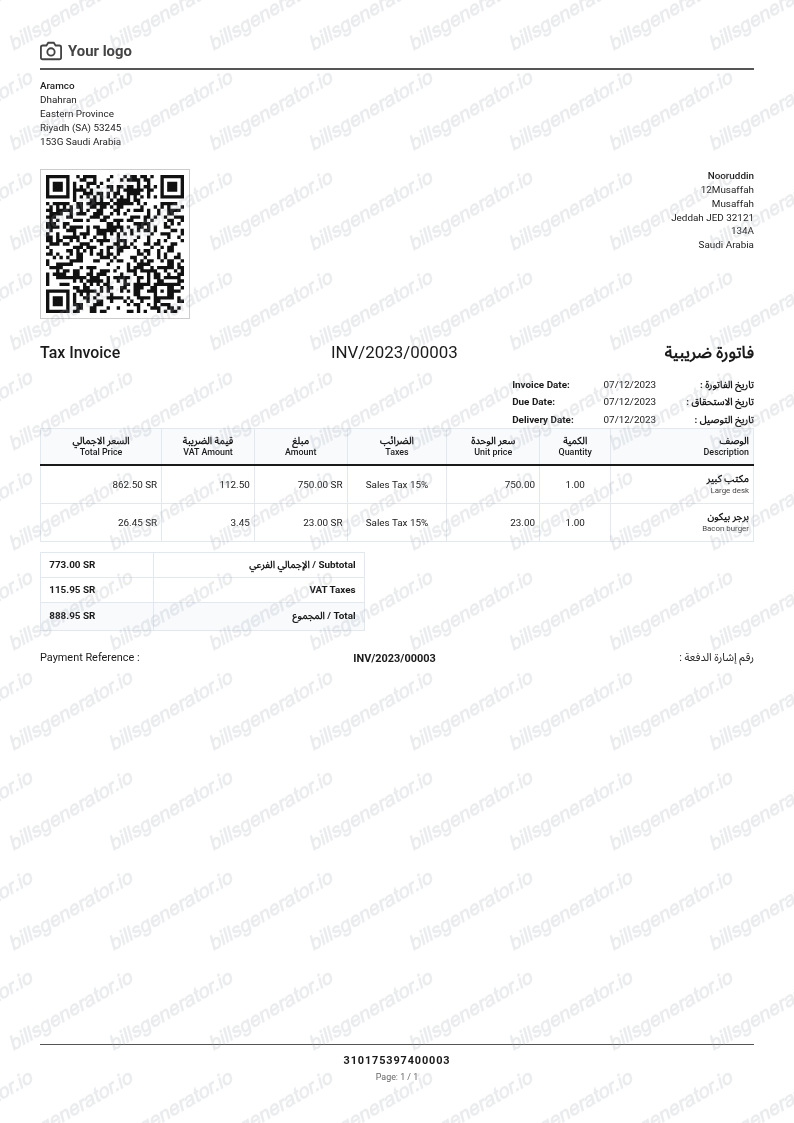
Quick summary
Saudi VAT receipt template overview
Create a Saudi ZATCA-compliant VAT tax invoice with supplier VAT registration number, invoice number and date, bill-to details, line items, 15% VAT, and total in SAR. Preview live and download a PDF.
What Is on a Real Saudi VAT Invoice?
Saudi Arabia runs one of the strictest e-invoicing regimes in the world - ZATCA's FATOORA system - so real Saudi tax invoices follow a tightly defined format. A credible replacement copy should match these rules field for field.
Two invoice types: simplified and standard
B2C sales get a simplified tax invoice issued at the point of sale; B2B and B2G sales require a standard tax invoice that includes the buyer's VAT number. Under FATOORA Phase 2, simplified invoices are reported to ZATCA within 24 hours, while standard invoices must be cleared by ZATCA in real time before the seller may share them.
Mandatory QR code since December 4, 2021
Every simplified tax invoice must carry a QR code, required since FATOORA Phase 1 took effect on December 4, 2021. Scanning it reveals the invoice data, which is how buyers and inspectors verify a Saudi receipt on the spot.
TLV-encoded QR content
The QR code is not a link - it is Base64 Tag-Length-Value (TLV) data containing the seller's name, the seller's VAT registration number, the invoice timestamp, the total with VAT, and the VAT amount. Phase 2 expands it with a cryptographic stamp and hash that make the invoice tamper-evident.
15-digit VAT registration number
The supplier's VAT registration number (TRN) is 15 digits - Saudi VAT numbers begin and end with the digit 3. It must appear on every tax invoice, and it is the first field checked when validating input VAT claims.
15% VAT since July 2020
Saudi Arabia tripled its standard VAT rate from 5% to 15% on July 1, 2020. Invoices show line items at VAT-exclusive prices, then the taxable amount, the 15% VAT as its own line, and the grand total in SAR.
Arabic text and sequential numbering
Tax invoices must be issued in Arabic (a translation may accompany the Arabic, not replace it) and carry a sequential invoice number and issue date. E-invoicing compliance is rolling out in revenue-based waves, so ZATCA-generated XML/PDF invoices are now the norm for registered businesses.
Create a print-ready Saudi VAT receipt
Edit the layout, watch it update live, then print, download PDF, or email.
Live Saudi VAT receipt preview
Watch the Saudi VAT receipt update in real time as you edit item rows, prices, and tax totals.
Print-ready PDF export
Download a clean, high-resolution Saudi VAT-style receipt in PDF format for bookkeeping or expense records.
Editable store & register fields
Customise store location, cashier or lane numbers, transaction reference codes, and payment details in $.
Mobile-friendly generator
Create and preview Saudi VAT receipts instantly on smartphone, tablet, or desktop browser.
Get Your Original Saudi VAT Invoice First
If the purchase was real, the compliant original is always better: ask the supplier to reissue the invoice from their ZATCA-approved e-invoicing system, since FATOORA requires registered businesses to store invoices electronically. Retail simplified invoices are printed or emailed at the point of sale, and many merchants can resend them from their POS records. Use this template when the original is unavailable - a supplier that closed, a lost point-of-sale slip, or an internal expense record that needs to be reconstructed.
Expense & reimbursement documentation
Document Saudi VAT purchases with itemized totals and tax lines for personal budgeting or expense reimbursement.
Lost receipt replacement
Recreate a clean itemized receipt record from transaction details when original thermal till slips are lost or faded.
Warranty & purchase recordkeeping
Maintain verifiable purchase documentation with date, time, and register references for inventory and record tracking.
Saudi VAT Receipt Formats
Choose the Saudi VAT receipt format that best matches your documentation and layout needs.
Standard Store Receipt
Standard Saudi VAT till receipt layout with item lines, subtotals, tax breakdown, and payment confirmation.
Itemized Detailed Receipt
Expanded layout with product SKU codes, quantity unit rates, discounts, and store register metadata.
Digital Order & Invoice
Clean electronic invoice format with customer reference numbers, transaction IDs, and payment method details in $.
Related Guides
Helpful guides on creating and using these invoices and bills.
Receipt guide
Saudi VAT Invoice (ZATCA)
The ZATCA tax invoice format and required fields at 15% VAT.
Explore Saudi VAT Invoice (ZATCA)Receipt guide
UAE VAT Invoice Format
The fields an FTA-compliant UAE tax invoice must include at 5% VAT.
Explore UAE VAT Invoice FormatReceipt guide
Retail Receipt for Expense Reports
See which fields a store receipt needs to qualify for expense report or reimbursement submission.
Explore Retail Receipt for Expense ReportsRelated Templates
Browse our collection of receipt templates for various purposes.

Saudi VAT Invoice FAQ
Common questions about creating and downloading a Saudi VAT Invoice-style tax invoice.
Open the Saudi VAT Invoice generator, edit the details, line items, charges, taxes, and total, then preview and download as a PDF.
Request it from the supplier. Since the FATOORA e-invoicing mandate, VAT-registered Saudi businesses must generate invoices electronically, so the seller can re-send the PDF or XML from their e-invoicing system. Retail purchases produce a simplified tax invoice at the point of sale - check your email or the merchant's app, or ask the store to reissue it with your purchase details.
A simplified tax invoice is for B2C sales: issued at the point of sale with fewer mandatory fields, a QR code, and reporting to ZATCA within 24 hours under Phase 2. A standard tax invoice is for B2B and B2G sales: it must include the buyer's VAT number, and under Phase 2 integration it is cleared by ZATCA's platform in real time before it may be shared with the buyer. Only a compliant tax invoice supports input VAT recovery.
Yes. Every field — line items, charges, taxes, and totals — is editable so the document matches your order.
A real Saudi tax invoice is in Arabic (translations may accompany it), shows the supplier's name, address, and 15-digit VAT registration number, a sequential invoice number and issue date, line items with VAT-exclusive prices, the 15% VAT amount as its own line, and the total in SAR. Simplified B2C invoices also carry a mandatory QR code; standard B2B invoices add the buyer's VAT number and address.
Receipt Generator · Receipt Maker · 300+ Free Templates
Create your Saudi VAT receipt
Use the editable Saudi VAT receipt generator to add items, tax totals, and payment details, then export a clean PDF.