Chipotle Receipt Generator
Create a Chipotle-style receipt with order details, grouped item lines, survey code, tax, adjustments, and payment summary. Export a clean PDF quickly.
Create a Chipotle-style receipt with order details, itemized extras, survey code, tax, and payment info. Download a PDF for purchase records or mockups.

Choose
Chipotle Receipt selected

Customize
Fill in your details

Download
Save or share receipt
Edit the details once and the preview updates instantly.
Quick summary
Chipotle receipt template overview
Use this Chipotle receipt generator to create authentic itemized receipts with editable products, tax calculations in $, and printable PDF export.
What Is on a Real Chipotle Receipt?
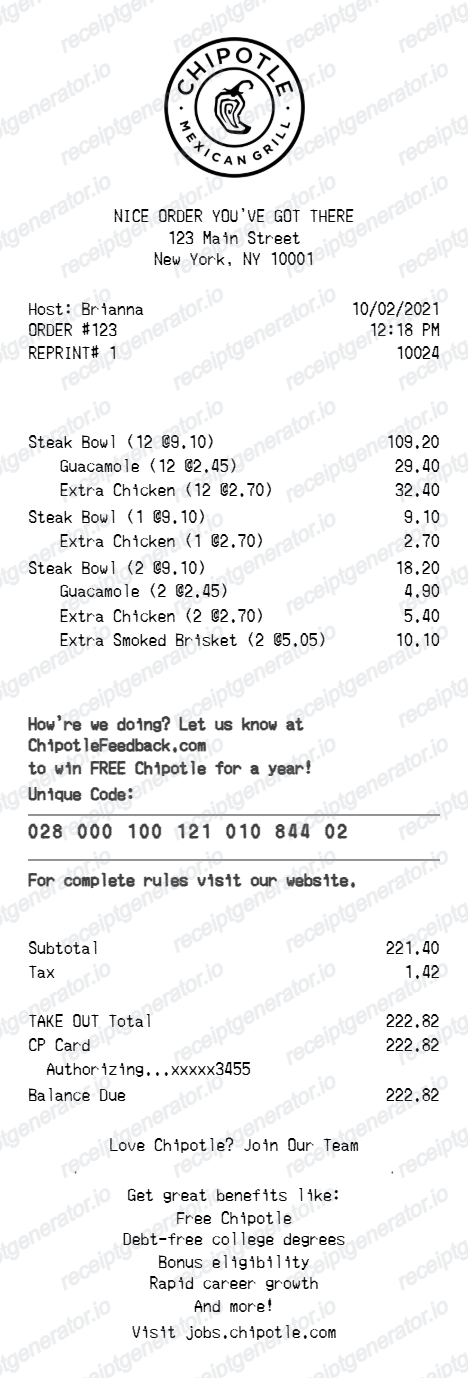
Chipotle receipts follow a consistent structure across in-store, Chipotlane, and delivery orders, and a credible replacement copy should match it field for field.
Order number and cashier name up top
The order number (e.g., #1847) prints in the left column near the top, paired with the cashier's name, since Chipotle assigns a fresh order number at each register throughout the day.
Grouped item customization lines
Bowls and burritos print as one line item, with each customization (rice, protein, salsa, toppings) listed as an indented sub-line underneath, mirroring how the digital kitchen display groups the build.
Chipotlane orders are tagged for drive-thru pickup
Orders placed ahead through the app or chipotle.com for Chipotlane pickup print with a pickup or drive-thru designation and a name or order code, since these are prepared before the customer arrives and staged for a specific lane.
Rewards points earned print at the bottom
For members who scan the in-app QR code at payment (including at the Chipotlane window), the receipt or order summary shows Rewards points earned as a footer line, alongside a prompt to join Chipotle Rewards if not enrolled.
Receipt Lookup recovers missed points
If a Rewards member forgets to scan during checkout, Chipotle's app has a Receipt Lookup feature under Account that credits missed points after submitting the receipt, typically processed within 24 to 48 hours.
Tax and total reflect the specific location
Since Chipotle sets menu prices and calculates tax by location, the subtotal, tax rate, and total on a receipt are specific to that restaurant rather than a fixed national menu price.
Create a print-ready Chipotle receipt
Edit the layout, watch it update live, then print, download PDF, or email.
Live Chipotle receipt preview
Watch the receipt update instantly as you edit order text, item rows, and totals.
One-click print
Print the Chipotle receipt directly from the browser.
Download as PDF
Export a clean Chipotle receipt PDF in seconds.
Mobile-friendly editor
Create and edit the receipt from desktop or mobile.
Need a Chipotle Receipt Template?
Build a Chipotle-style receipt with grouped item lines, survey code, tax, adjustments, and payment details, then export it as a clean PDF.
Purchase records
Document a Chipotle order with item lines, extras, and payment details.
Restaurant mockups
Use the Chipotle-style receipt format for design, demo, or presentation mockups.
Order documentation
Generate a clear receipt layout for internal tracking or example records.
Fast casual receipt examples
Create a realistic restaurant receipt format with grouped extras and payment summary.
Chipotle Receipt Formats
Choose the Chipotle-style receipt layout that best matches your restaurant receipt and documentation needs.
Standard Chipotle Receipt
A Chipotle-style receipt with order details, item rows, and payment summary.
Grouped Extras Receipt
A Chipotle receipt format where extras appear under each main item line.
Survey Code Receipt
A Chipotle-style receipt with survey prompt, unique code, and footer text.
Related Guides
Explore related guides to understand the receipt details, lookup steps, and documentation workflows.
Related Other Receipt Templates
More free receipt templates for restaurant and retail expense records.

Chipotle Receipt FAQ
Common questions about creating a Chipotle-style fast casual restaurant receipt for records, mockups, and documentation.
Choose the Chipotle receipt template, edit the order details, item lines, extras, tax, and payment section, then preview and download the receipt as a PDF.
Yes. You can change the survey lines, unique code, and the recruiting footer content shown near the bottom of the receipt.
Yes. Download a clean Chipotle-style receipt PDF for documentation, mockups, or presentation purposes.
A real Chipotle receipt shows the order number and cashier name, grouped item lines with customizations listed as sub-lines beneath each bowl or burrito, subtotal, tax, total, the payment method, and - for Rewards members who scanned at checkout - points earned printed near the bottom.
Add the store name, purchase date, line items, totals, tax, payment method, and any optional notes you need on your Chipotle template.
Yes. The template supports grouped extras under each main item so the receipt matches the Chipotle-style item layout.
Yes. The totals area supports tax plus additional plus or minus adjustment rows before the payment summary.
For app or chipotle.com orders, open Order History in your account to view and resend the receipt. For in-store or Chipotlane purchases, check your card statement for the charge, or use Receipt Lookup under Account in the app if you need to claim missed Rewards points.
Yes. Chipotle's app has a Receipt Lookup feature under Account where members can submit the receipt to claim missed points, typically credited within 24 to 48 hours, as long as the receipt is retained.
Both. You can use these templates for reimbursements, bookkeeping prep, and internal documentation workflows.
Receipt Generator · Receipt Maker · 300+ Free Templates
Create your Chipotle receipt
Use the editable Chipotle receipt generator to add items, tax totals, and payment details, then export a clean PDF.