Pizza Hut Receipt Generator
Create a Pizza Hut-style receipt with store details, pizza and side item rows, delivery or dine-in fee, tax, total, Hut Rewards points, and card or cash payment. Preview live and export a PDF.
Create a Pizza Hut-style receipt with editable store details, pizza and side item rows, delivery fee, tax, total, and payment information. Download a clean PDF for meal records or expense documentation.

Choose
Pizza Hut Receipt selected

Customize
Fill in your details

Download
Save or share receipt
Edit the details once and the preview updates instantly.
Quick summary
Pizza Hut receipt template overview
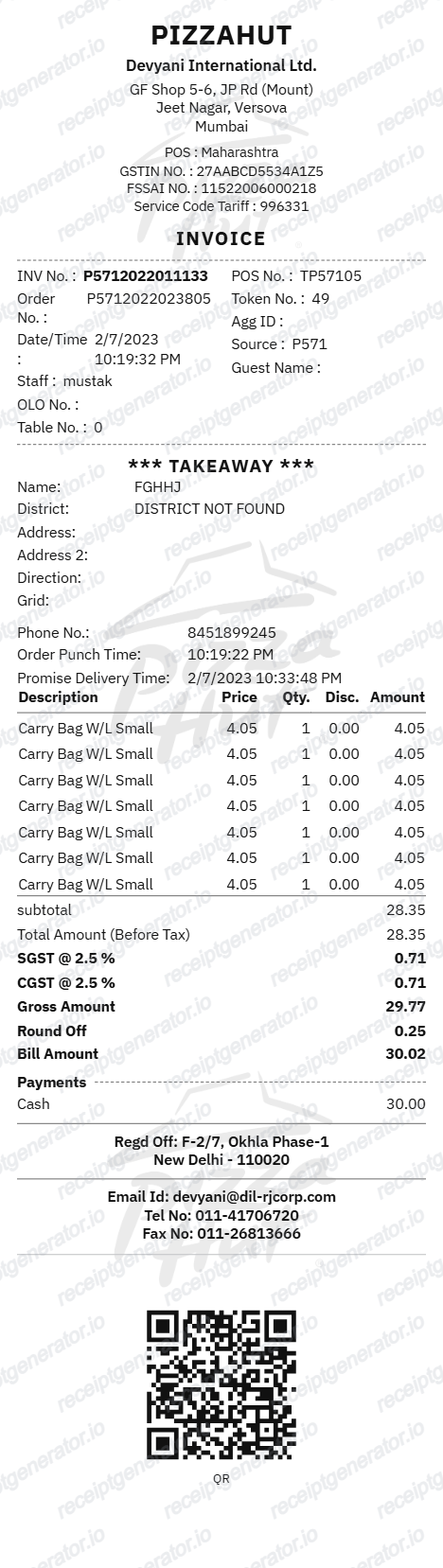
Use this Pizza Hut-style receipt template to build a complete pizza order receipt with store details, pizza and side rows, crust and topping lines, delivery fee, subtotal, tax, payment summary, and Hut Rewards footer.
What Is on a Real Pizza Hut Receipt?
Before you rebuild a Pizza Hut receipt, it helps to know what the original contains. Pizza Hut receipts follow a consistent order structure across delivery, carryout, and dine-in, and a credible replacement copy should match it field for field.
Order type is printed clearly - delivery, carryout, or dine-in
Every Pizza Hut receipt states the order channel at the top. Dine-in receipts add table and guest information, while delivery and carryout receipts show the order number more prominently since customers use it to track or reference the order.
Hut Rewards is a points-based program, not flat cashback
Members earn 10 points per whole $1 spent (before tax and most fees) on dine-in, carryout, and delivery orders, then redeem points for menu items through the app or website - not at checkout in-store or by phone. A receipt tied to a rewards account may reference a points total or phone-number lookup rather than an instant discount.
Order number appears on the receipt, app, and confirmation email
The same order number prints on the paper receipt near the top, the app order screen, and the email confirmation sent when the order is placed online, so all three sources should match for a given order.
Delivery orders can be tracked in real time
Digital delivery orders support Pizza Hut's order tracker, which shows status at three stages: order received, order being made, and out for delivery, with optional text alerts - a feature tied to the order number rather than the printed receipt itself.
Crust and topping modifiers print as indented lines
Each pizza row is followed by indented modifier lines for crust style (pan, thin, stuffed), size, sauce, and additional toppings, rather than listing toppings as separate standalone items.
Survey code footer
Most receipts end with a tellpizzahut.com feedback survey code beneath the totals and payment section, positioned near any Hut Rewards messaging.
Create a print-ready Pizza Hut receipt
Edit the layout, watch it update live, then print, download PDF, or email.
Live Pizza Hut receipt preview
Watch the receipt update instantly as you edit store details, pizza rows, crust lines, delivery fee, totals, and payment information.
Editable receipt sections
Update store header, order number, pizza and side rows, modifier lines, delivery fee, totals, payment details, and Hut Rewards footer.
Download as PDF
Export a clean Pizza Hut-style receipt PDF when your order details are ready.
Mobile-friendly editor
Create, preview, and revise the Pizza Hut receipt from desktop or mobile.
Get Your Original Pizza Hut Receipt First
If you ordered online or through the app, check your email for the order confirmation, or open order history in the Pizza Hut app - both list the same order number, items, and totals as the printed receipt. For carryout or dine-in, ask the store for a reprint using your order number or approximate order time. Use this template when the original is unavailable - a missed confirmation email, a lost paper receipt, or an order placed by someone else.
Pizza delivery expense records
Document a Pizza Hut order with pizza and side details, delivery fee, tax, total, and payment information.
Lost receipt recovery
Recreate a Pizza Hut receipt when the original email confirmation was lost or the printed copy was misplaced.
Receipt mockups
Use the Pizza Hut-style layout for demos, training materials, or presentation mockups.
Team meal documentation
Create a clean pizza order receipt for office team lunches or group meal expense reporting.
Pizza Hut Receipt Formats
Choose the Pizza Hut-style receipt layout that best matches your delivery, carryout, dine-in, or loyalty receipt needs.
Pizza Delivery Receipt
A Pizza Hut-style receipt with pizza rows, delivery fee, tax, and payment summary.
Dine-In Receipt
A Pizza Hut receipt for sit-down orders with pizza, pasta, sides, and dine-in totals.
Hut Rewards Receipt
A Pizza Hut receipt with loyalty points text and Hut Rewards footer messaging.
Restaurant Receipt Guides
Read supporting guides for restaurant receipts, meal reimbursement, and pizza delivery expense documentation.
Restaurant Receipt for Reimbursement
See what expense teams require from a restaurant receipt for meal reimbursement approval.
Explore Restaurant Receipt for ReimbursementRestaurant Receipt for Taxes
Review what delivery and restaurant receipt fields matter most for business meal tax deductions.
Explore Restaurant Receipt for TaxesRelated Other Receipt Templates
More free receipt templates for pizza, fast food delivery, and restaurant meal expense records.
Pizza Hut Receipt FAQ
Common questions about creating, editing, and downloading a Pizza Hut-style receipt for meal records, delivery expense documentation, and receipt examples.
Open the Pizza Hut receipt generator, edit the store details, order date, pizza and side item rows, delivery fee, subtotal, tax, total, and payment section, then preview and download the receipt as a PDF.
Yes. The totals section supports additional rows for delivery fee, service charge, tip, subtotal, tax, and final total.
Check the email confirmation sent when you ordered online or through the app - it lists the same order number, items, and totals as the printed receipt. For carryout or dine-in, the order number is printed near the top of the paper receipt; if you no longer have it, contact the store directly with your approximate order time and payment method.
Hut Rewards is a points-based loyalty program: members earn 10 points for every whole $1 spent on eligible items (before tax and most fees) across dine-in, carryout, and delivery orders, then redeem accumulated points for menu items through the app or website. It is not a percentage cashback program, and points expire after six consecutive months of account inactivity.
Both. You can use these templates for reimbursements, bookkeeping prep, and internal documentation workflows.
Yes. Add personal, medium, or large pizzas, pasta, bread sticks, wings, stuffed crust options, drinks, and desserts with quantities and prices.
Yes. The receipt footer supports editable loyalty text so you can add Hut Rewards points, member number, or promotional messaging.
A real Pizza Hut receipt shows the store address and phone number, the order type (dine-in, carryout, or delivery), an order number, the date and time, each pizza and side on its own line with crust, size, and topping details, delivery fee where applicable, subtotal, tax, total, the payment method, and a tellpizzahut.com survey code near the footer.
Add the store name, purchase date, line items, totals, tax, payment method, and any optional notes you need on your Pizza Hut template.
This tool creates an editable Pizza Hut style layout for documentation. It is not issued by the original merchant or brand system.
Receipt Generator · Receipt Maker · 300+ Free Templates
Create your Pizza Hut receipt
Use the editable Pizza Hut receipt generator to add pizza and side rows, crust customization lines, delivery fee, totals, and payment details, then export a clean PDF for your records.