Free Food Delivery Receipt Generator
Create Free Food Delivery Receipts Online - Add Items, Fees & Tips. Preview free; watermark-free PDF export requires a paid plan.
Create a food delivery receipt with menu items, delivery fees, tip, and tax. Download a clean PDF for meal orders, reimbursements, or delivery records.

Choose
Food Delivery Receipt selected

Customize
Fill in your details

Download
Save or share receipt
Edit the details once and the preview updates instantly.
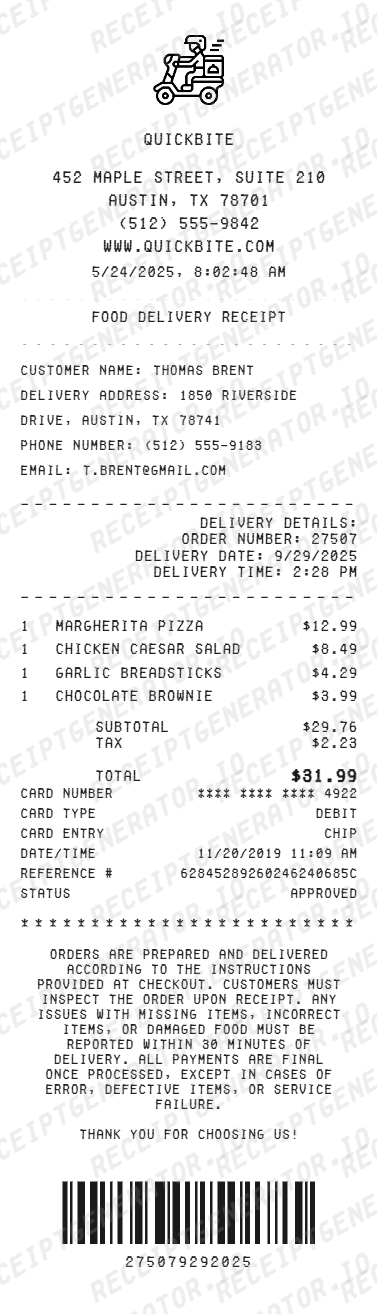
Quick summary
Food Delivery receipt template overview
Create Food Delivery Receipts Online - Add Items, Fees & Tips. Preview the layout before choosing a PDF export plan.
What Is on a Real Food Delivery Receipt?
Whether the order comes through a third-party app, a restaurant's own delivery service, or a phone order with in-house drivers, delivery receipts stack the same core fee types on top of the food subtotal - here is what to expect.
A layered fee stack, not one flat delivery charge
Real delivery receipts separate charges into distinct lines - a delivery fee (covers the trip), a service or platform fee (covers the ordering system), and sometimes a small-order fee if the cart is under a minimum - rather than folding them into a single number.
Driver tip as its own line, added after fees
Tip is calculated and shown separately from the delivery and service fees, usually appearing just before the grand total - this keeps the driver's gratuity distinct from the fees the restaurant or platform keeps.
Order tracking or confirmation number
Delivery orders are assigned a tracking or confirmation number distinct from an in-store order number, since the order needs to be tracked from kitchen to hand-off - this number is what support teams ask for if an order is late or wrong.
Delivery address printed on the receipt
Unlike a dine-in or takeout receipt, a delivery receipt includes the drop-off address as a required field, since it documents where the order was actually fulfilled.
Restaurant-direct delivery vs third-party platform delivery
When a restaurant runs its own delivery (its own drivers, its own site or phone orders), the receipt usually shows fewer fee lines - often just a flat delivery fee - compared to third-party marketplace platforms that add separate service and platform fees on top.
Tax calculated on food only, not on fees or tip
Sales tax is typically applied to the food subtotal alone; delivery fees, service fees, and tips are generally not taxed, so the tax line sits between the food subtotal and the fee/tip lines rather than after the full fee stack.
Print-ready food delivery receipts
Edit the layout, watch it update live, then print, download PDF, or email.
Live food delivery receipt preview
Watch your receipt update instantly as you add food items, delivery fees, and tip.
One-click print
Print your food delivery receipt directly from the browser - no app or login needed.
Download food delivery receipt as PDF
Save a clean, print-ready PDF for expense reports, reimbursements, or personal records.
Auto fee & tip totals
Subtotal, delivery fee, service fee, tip, and grand total calculate automatically as you edit.
Get Your Original Food Delivery Receipt First
If the order came through a delivery app, check the order history or past orders section of that app for the itemized receipt and emailed confirmation. For restaurant-direct delivery, the restaurant can usually confirm the order and fees if you provide the date, phone number used, and delivery address. Use this template when the original is unavailable - a deleted account, a phone order with no emailed copy, or a receipt that never arrived.
Lost delivery receipt
Recreate food delivery receipts for expense reports.
Business meal expenses
Generate receipts for client lunches and team delivery orders.
Work reimbursements
Create receipts for work lunch or office meal delivery orders.
Tax documentation
Build receipts for deductible meal delivery expenses.
Delivery Receipt Types
Choose the format for your delivery order.
Standard Delivery Receipt
Food order with items, delivery fee, service fee, tip, and tax.
Group Order Receipt
Full itemized receipt for team or office lunch delivery orders.
Business Meal Receipt
Detailed receipt showing meals, fees, tip, and tax for expense filing.
Related Guides
Explore related guides to understand the receipt details, lookup steps, and documentation workflows.
Receipt guide
Food Delivery Receipt for Taxes
Review what food delivery receipt fields are needed when documenting purchases for business meal tax deductions.
Explore Food Delivery Receipt for TaxesEditable template
Restaurant Receipt Generator template
Explore this editable receipt layout and its fields before opening the editor.
Explore Restaurant Receipt Generator templateReceipt guide
Restaurant Receipt for Taxes
Review the restaurant receipt fields that matter most for business meal documentation.
Explore Restaurant Receipt for TaxesMore free receipt templates for food delivery, DoorDash, Uber Eats, restaurants, and takeout.




Food Delivery Receipt FAQ - Frequently Asked Questions
Get answers on how to create, customize, and download free food delivery receipts online.
Choose the food delivery receipt template, enter the restaurant name, order date, food items with prices, delivery fee, service fee, and tip. Preview and download as PDF in seconds.
Yes. Add exact amounts for delivery fee, service fee, and tip - all totals update automatically.
Yes. Add minimum order fees, small cart charges, or any other surcharges as separate line items.
Yes. Many users generate food delivery receipts for business meal expense reports, work lunch reimbursements, and travel food allowances. Check with your employer or accountant about documentation requirements.
A real delivery receipt shows the restaurant name, itemized food and drinks, the delivery address, an order tracking or confirmation number, then a fee stack - delivery fee, service fee, and any small-order fee - followed by tax (usually on food only), driver tip, and the grand total.
Add the restaurant name, order date, food items, quantities, prices, delivery fee, service fee, tax, tip, and payment method.
Enter the delivery address in the receipt header or order details section for a complete, accurate record.
Yes. The template works for any food delivery order regardless of platform - add food items, fees, and tip to match your original receipt layout.
Third-party app orders (DoorDash, Uber Eats, Grubhub, and similar) keep a full order history with the itemized receipt under your account. Restaurant-direct delivery orders are usually confirmed by calling the restaurant with the order date and delivery address, since many don't email a formal receipt for phone orders.
Delivery fees, service fees, tip, and sometimes marked-up menu pricing on third-party platforms all stack on top of the restaurant's dine-in prices - this is normal and reflects how delivery platforms and restaurant-direct delivery cover driver and platform costs, not a billing error.
Receipt Generator · Receipt Maker · 300+ Free Templates
Create your Food Delivery receipt
Use the editable Food Delivery receipt generator to add items, tax totals, and payment details, then export a clean PDF.