Free Food Truck Receipt Generator
Create Free Food Truck Receipts Online - Add Items, Gratuity & Mobile Payment Details. Download PDF Instantly.
Create a food truck receipt with menu items, gratuity, tax, and mobile payment details. Download a clean PDF for meal records or reimbursements.

Choose
Food Truck Receipt selected

Customize
Fill in your details

Download
Save or share receipt
Edit the details once and the preview updates instantly.
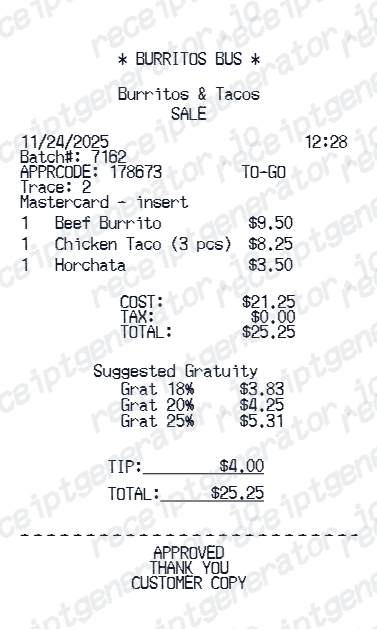
Quick summary
Food Truck receipt template overview
Use this Food Truck receipt generator to create authentic itemized receipts with editable products, tax calculations in $, and printable PDF export.
What Is on a Real Food Truck Receipt?
Food truck receipts look a little different from a sit-down restaurant check because the business itself is mobile. Here is what typically appears on the original.
Mobile POS systems, not fixed registers
Square and Toast are the two dominant point-of-sale platforms for food trucks - both run on a tablet or handheld reader instead of a fixed countertop terminal, and both print or email a digital receipt directly from the device.
Location instead of a street address
Since a food truck has no fixed storefront, the receipt usually shows the truck or business name plus the city, neighborhood, or the name of the event or festival it was parked at that day, rather than a permanent street address.
Increasingly card and app-based payments
Food trucks were historically cash-heavy because they lacked traditional storefront banking setups, but most now accept card payments through Square or Toast readers and offer Venmo or Cash App QR codes at the window as a cash alternative.
Street food menu items
Add tacos, burgers, bowls, drinks, and specials with individual quantities and prices.
Suggested gratuity display
Mobile POS checkout screens commonly show preset tip suggestions like 18%, 20%, and 25% so customers can quickly choose gratuity before paying.
Auto tax calculation
Set a tax rate once - subtotal, tax, tip, and grand total calculate automatically across all items.
Print-ready food truck receipts
Edit the layout, watch it update live, then print, download PDF, or email.
Live food truck receipt preview
Watch your receipt update instantly as you add menu items, gratuity, and payment details.
One-click print
Print your food truck receipt directly from the browser - no app or login needed.
Download food truck receipt as PDF
Save a clean, print-ready PDF for expense reports, reimbursements, or personal records.
Auto gratuity & tax totals
Subtotal, gratuity, tax, and grand total calculate automatically as you edit.
Get Your Original Food Truck Receipt First
If you paid by card or app, check your bank statement or Square/Toast digital receipt email first - both platforms text or email a receipt automatically when the truck captures your contact info at checkout. Venmo and Cash App also keep a payment history if you paid the vendor directly through a QR code. Use this template when the original is unavailable - a cash payment with no receipt, a one-off festival vendor, or a lost email.
Lost food truck receipt
Recreate food truck receipts for expense reports and record-keeping.
Food festival purchases
Generate receipts for festival food purchases and multi-vendor events.
Work event catering
Create receipts for corporate events and team catering orders from food trucks.
Tax documentation
Build receipts for deductible meal expenses and business accounting records.
Food Truck Receipt Types
Choose the format that matches your mobile food order.
Street Food Receipt
Standard food truck order with menu items, gratuity suggestions, and tax.
Event Catering Receipt
Detailed receipt for food truck catering orders at private or corporate events.
Mobile Vendor Receipt
Compact mobile POS receipt with transaction details, payment data, and totals.
Related Guides
Explore related guides to understand the receipt details, lookup steps, and documentation workflows.
Related Other Receipt Templates
More free receipt templates for food trucks, street vendors, fast food, and restaurants.




Food Truck Receipt FAQ - Frequently Asked Questions
Get answers on how to create, customize, and download free food truck and street vendor receipts online.
Choose the food truck receipt template, enter the truck name, date, menu items with prices, gratuity, tax, and payment details. Preview and download as PDF in seconds.
Yes. Add card type, approval code, transaction reference, and payment method details for complete mobile POS records.
Both. Use it for personal expense tracking, business reimbursements, bookkeeping prep, and internal documentation workflows.
Yes. Many users generate food truck receipts for business meal expense reports, event reimbursements, and travel meal allowances. Check with your employer or accountant about documentation requirements.
A real food truck receipt shows the truck or business name, the city or event/festival location instead of a street address, itemized menu items with prices, a suggested tip screen total (often 18-25%), sales tax, and the payment method - typically printed from a Square or Toast mobile POS.
Add the food truck name, date, menu items, quantities, prices, gratuity, tax rate, payment method, and optional transaction details.
Yes. The template works for food trucks, street vendors, pop-ups, and mobile catering businesses.
Yes. If you lost your food truck receipt, enter the truck name, date, and items ordered to recreate it as a PDF for expense or reimbursement purposes.
Check your email or text messages first - Square and Toast, the two most common food truck POS platforms, both send a digital receipt automatically if you entered your contact info at checkout. If you paid with a Venmo or Cash App QR code, the payment history in that app will confirm the vendor, date, and amount even without a formal receipt.
Not always automatically - food trucks are historically cash-heavy and a paper receipt isn't guaranteed unless you ask for one at the window. Increasingly, though, most trucks run card payments and app QR codes through Square or Toast, which print or email a receipt by default.
Receipt Generator · Receipt Maker · 300+ Free Templates
Create your Food Truck receipt
Use the editable Food Truck receipt generator to add items, tax totals, and payment details, then export a clean PDF.