Free McDonald's Receipt Generator
Create Free McDonald's-Style Fast Food Receipts Online - Add Items, Order Number & Promotions. Preview free; watermark-free PDF export requires a paid plan.
Create a McDonald's receipt with combo meals, order details, tax, and payment. Download a clean PDF for meal records or reimbursements.

Choose
McDonald's Receipt selected

Customize
Fill in your details

Download
Save or share receipt
Edit the details once and the preview updates instantly.
Quick summary
McDonald's receipt template overview
Create McDonald's-Style Fast Food Receipts Online - Add Items, Order Number & Promotions. Preview the layout before choosing a PDF export plan.
What Is on a Real McDonald's Receipt?
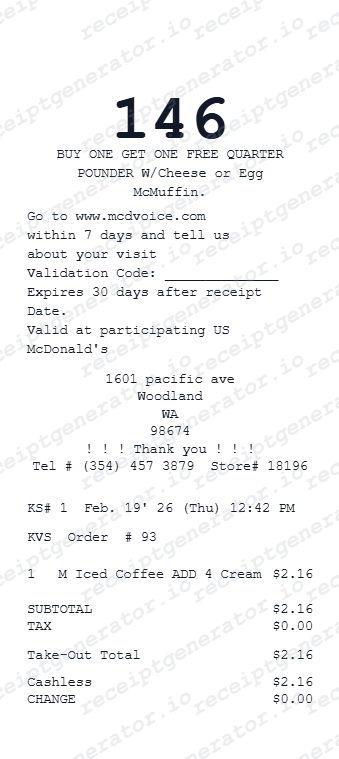
Before you rebuild a McDonald's receipt, it helps to know exactly what the original contains. McDonald's receipts follow a consistent structure across US locations, and a credible replacement copy should match it field for field.
Restaurant number above the address
Every US receipt prints "McDonald's Restaurant #XXXX" near the top, above the store address - this is different from the order number and identifies the specific franchise location for reprints or lookups.
Two-digit order number
Below the visit date and time, the order number appears as a two-digit code tied to that day's queue, not a unique lifetime identifier like an Amazon order ID.
Order channel: counter, drive-thru, kiosk, app, or delivery
The receipt reflects how the order was placed. Kiosk and app orders often show a pickup or order-ready number, while Mobile Order & Pay receipts reference the app order instead of a register transaction.
Combo meal line items
Combo meals typically print as one bundled line, but some registers break out the sandwich, fries, and drink separately, especially when a size is upgraded.
MyMcDonald's Rewards points
Orders linked to a MyMcDonald's Rewards account earn 100 points per dollar spent on eligible items; the app order summary or receipt reflects the points credited, and missing points can be manually claimed using the restaurant number, order number, date, time, and total.
Survey code and take-out total
A mcdvoice.com survey code usually prints near the bottom, and the final total is labeled "Take-Out Total" or "Eat-In Total" depending on how the order was placed.
Print-ready McDonald's receipts
Edit the layout, watch it update live, then print, download PDF, or email.
Live McDonald's receipt preview
Watch your receipt update instantly as you add menu items, order number, and payment details.
One-click print
Print your McDonald's-style receipt directly from the browser - no app or login needed.
Download McDonald's receipt as PDF
Save a clean, print-ready PDF for expense reports, reimbursements, or personal records.
Auto tax & order totals
Subtotal, tax, and take-out total calculate automatically as you edit each line item.
Get Your Original McDonald's Receipt First
If the order still exists, the original is always better: check My Orders in the McDonald's app for Mobile Order & Pay or delivery purchases, or ask the restaurant for a reprint using the restaurant number, approximate visit date, time, and order total. Use this template when the original is unavailable - a lost paper receipt, a cash purchase, or an order placed by someone else.
Lost McDonald's receipt
Recreate McDonald's receipts for expense reports and personal records.
Business meal expenses
Generate receipts for team lunches and work meals at McDonald's.
Work reimbursements
Create receipts for work lunch, drive-through orders, and travel meal stops.
Tax documentation
Build receipts for deductible meal and business dining expenses.
McDonald's Receipt Types
Choose the format that matches your McDonald's order.
Single Order Receipt
Quick receipt for one McDonald's order with items, tax, and total.
Combo Meal Receipt
Itemized receipt showing combo meals, sides, and drinks with prices.
Drive-Through Receipt
Compact receipt matching McDonald's drive-through order format.
Receipt Guides
Read the supporting McDonald's guides to recover receipts, handle reimbursements, and create cleaner fast food meal records.
Receipt guide
How to Get a McDonald's Receipt
Learn the fastest ways to recover a McDonald's receipt from the original order or digital order details.
Explore How to Get a McDonald's ReceiptEditable template
Restaurant Receipt Generator template
Explore this editable receipt layout and its fields before opening the editor.
Explore Restaurant Receipt Generator templateReceipt guide
Restaurant Receipt for Taxes
Review the fast food receipt fields that matter most for business meal documentation.
Explore Restaurant Receipt for TaxesMore free receipt templates for fast food, burgers, pizza, and restaurant orders.




McDonald's Receipt FAQ - Frequently Asked Questions
Get answers on how to create, customize, and download free McDonald's-style fast food receipts online.
Choose the McDonald's receipt template, enter the store name, order date, menu items with prices, and tax. Preview and download as PDF in seconds.
Free previews include all editing features. Watermark-free PDF downloads are available on paid plans. Check the pricing page for details.
Both. Use it for personal expense tracking, business meal reimbursements, bookkeeping prep, and internal documentation workflows.
Orders placed through the McDonald's app or Mobile Order & Pay keep a digital order history you can review in the app. For counter, drive-thru, or kiosk orders, ask the restaurant for a reprint with your approximate visit date, time, and order number - most locations can look up recent till transactions using the restaurant number printed on the original receipt. See our full guide for a complete step-by-step walkthrough.
Yes. Business meal receipts commonly need the restaurant location, date, itemized purchases, and total for expense reports or deductible meal documentation. Check with your employer or accountant about specific requirements, since some require the payment method or attendee details as well.
Yes. The order number is fully editable and displayed prominently at the top of the receipt - just like a real McDonald's receipt.
Add the store name, address, order date, menu items, quantities, prices, tax rate, payment method, order number, and optional survey or promo details.
Yes. Many users generate McDonald's-style receipts for business meal expense reports, work lunch reimbursements, and travel food allowances. Check with your employer or accountant about documentation requirements.
A real McDonald's receipt shows the restaurant number near the top, the visit date and time, a two-digit order number, each item with its price (combo meals often list the drink, side, and main separately), the order channel (counter, drive-thru, kiosk, app, or delivery), subtotal, sales tax, and the take-out or dine-in total. A mcdvoice.com survey code usually appears near the bottom.
Receipt Generator · Receipt Maker · 300+ Free Templates
Create your McDonald's receipt
Use the editable McDonald's receipt generator to add items, tax totals, and payment details, then export a clean PDF.