Gym Receipt Generator
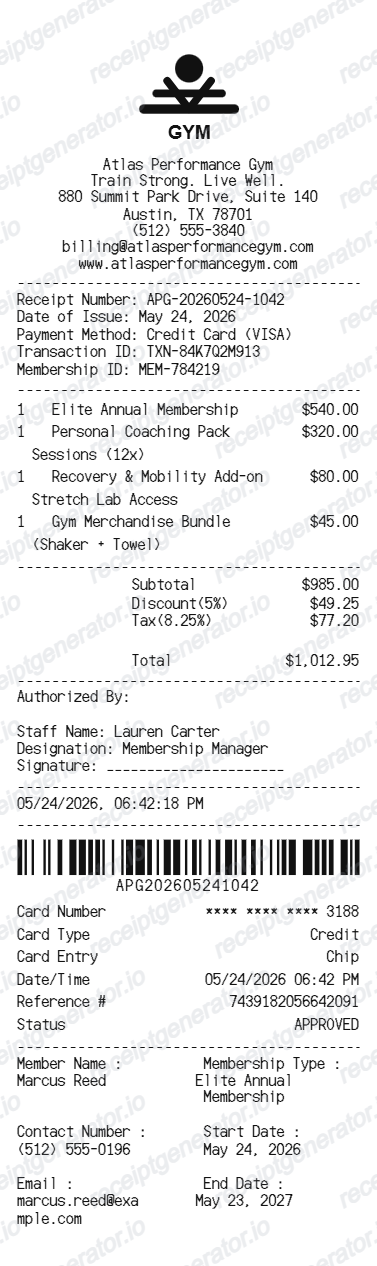
Create a gym-style receipt with club details, membership charges, totals, payment details, barcode, and member information.
Create an editable gym receipt with business details, membership services, subtotal, discount, tax, total, card details, barcode, and member information.

Choose
Gym Receipt selected

Customize
Fill in your details

Download
Save or share receipt
Edit the details once and the preview updates instantly.
Quick summary
Gym receipt template overview
Create a gym-style receipt with club details, membership charges, totals, payment details, barcode, and member information.
What Is on a Real Gym Receipt?
Gym billing separates one-time signup costs from recurring dues, and the contract type changes both the price and what fees show up. Here is what a real gym receipt or membership statement includes.
Initiation or enrollment fee, billed once
A one-time initiation fee - commonly $25-$100, though it is often negotiable or waived during promotions - covers setup, keycard issuance, and onboarding. It appears as its own line separate from recurring dues.
Month-to-month vs. annual contract pricing
Committing to an annual contract can cost up to 44% less than month-to-month, but contract memberships often layer on enrollment fees, annual maintenance fees, and processing fees that a simple month-to-month plan does not have.
Annual maintenance or enhancement fee
Many contract gyms charge a recurring annual fee (roughly $30-$50) separate from monthly dues, billed automatically on the membership anniversary rather than the regular monthly cycle.
Add-on charges itemized separately
Personal training packages, recovery services, and merchandise are billed as distinct line items from base membership dues, since they are typically optional and priced independently.
Card approval and payment method on file
Because dues recur automatically, gym receipts commonly show the card type, last digits, and an approval code rather than a one-time payment confirmation.
Cancellation and freeze fee disclosures
Contract gyms often note early cancellation penalties ($50-$200 or the remaining balance) and freeze fees on the membership agreement referenced by the receipt, which is why keeping the itemized statement matters if a member later disputes a charge.
Create a print-ready gym receipt
Edit the layout, watch it update live, then print, download PDF, or email.
Live gym receipt preview
Watch the receipt update as you edit club details, service rows, totals, payment information, barcode, and member details.
Editable fitness receipt layout
Use a compact thermal-style receipt layout with dividers, line items, totals, authorization, payment details, and member information.
Download as PDF
Export a clean gym receipt PDF for records, examples, demos, or mockups.
Mobile-friendly editor
Create and edit gym receipts from desktop, tablet, or phone.
Get Your Original Gym Receipt First
If you are an active member, sign in to the gym's member app or portal and check billing or payment history for itemized statements, or ask the front desk to email a copy - most gyms keep billing records tied to the membership account. Use this template when the original is unavailable - a cancelled membership, a missing emailed receipt, or a mockup for design and testing purposes.
Membership receipt examples
Create receipt examples for gym memberships and fitness club charges.
Training service records
Generate receipt mockups for coaching, training sessions, and add-on services.
Fitness billing mockups
Use the gym receipt format for billing demos, account examples, or UI testing.
Gym Receipt Template Types
Create gym receipts for memberships, personal training packages, add-on services, and fitness club payment examples.
Gym membership receipt
A receipt for annual or monthly gym membership charges.
Personal training receipt
A receipt with coaching packages, session counts, and service charges.
Fitness club payment receipt
A compact receipt with totals, card approval details, barcode, and member information.
Related Guides
Explore related guides to understand the receipt details, lookup steps, and documentation workflows.
Receipt guide
Repair Receipt for Insurance Claims
See which service and payment fields make a repair or service record easier to review.
Explore Repair Receipt for Insurance ClaimsEditable template
Repair Receipt template
Explore this editable receipt layout and its fields before opening the editor.
Explore Repair Receipt templateMore free receipt templates for service and retail expense records.




Gym Receipt FAQ
Common questions about creating, editing, and downloading a gym receipt.
Open the gym receipt generator, edit the club details, receipt details, membership rows, totals, payment details, barcode, and member information, then preview and download as a PDF.
Yes. The template includes editable card details, approval status, member name, membership type, contact information, and start or end dates.
Sign in to the gym's member app or website and check billing or payment history, which typically lists itemized charges by billing cycle. If the account is closed or you cannot find it online, contact the front desk or membership services with the approximate billing date - most gyms retain records tied to the membership.
It is much harder. Banks and gyms both expect an itemized statement showing what the charge covered - dues, an add-on fee, or a cancellation penalty - before they will process a dispute or refund, so keeping the itemized receipt matters more than just the total amount charged.
Yes. You can edit membership charges, personal coaching, recovery add-ons, merchandise, and other gym service rows.
Yes. The totals sections support editable subtotal, discount, tax, and final total values.
A real gym receipt separates the one-time initiation or enrollment fee from recurring monthly or annual dues, itemizes add-ons like personal training or merchandise, and shows the payment method with an approval code rather than a simple total, since dues are billed automatically on a recurring cycle.
Receipt Generator · Receipt Maker · 300+ Free Templates
Create your Gym receipt
Use the editable Gym receipt generator to add items, tax totals, and payment details, then export a clean PDF.