Macy's Receipt Generator
Create a Macy's-style retail receipt with editable item rows, Sales Tax summary, Star Rewards, and payment details. Export a clean PDF in minutes.
Create a Macy's-style receipt with retail items, Sales Tax-inclusive totals, Star Rewards, payment, and footer text. Download a PDF for records.

Choose
Macy's Receipt selected

Customize
Fill in your details

Download
Save or share receipt
Edit the details once and the preview updates instantly.
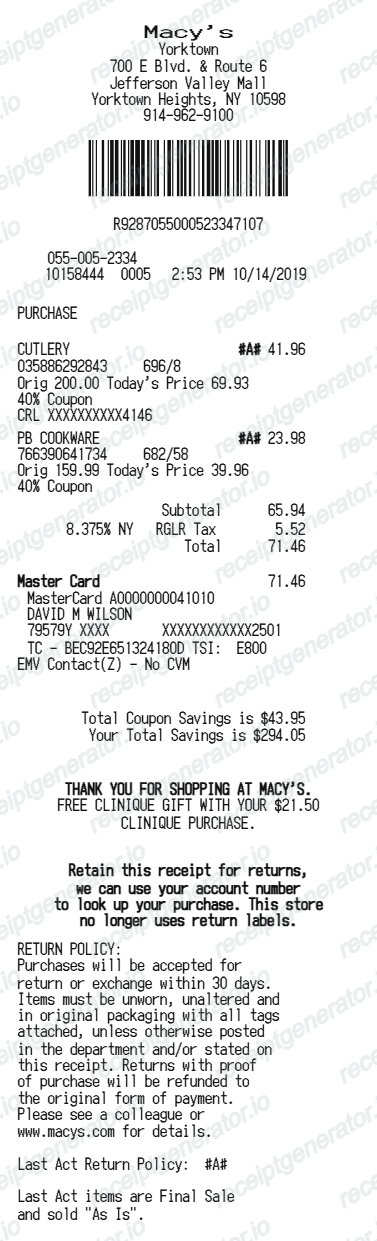
Quick summary
Macy's receipt template overview
Use this Macy's-style receipt template to build a compact United States receipt with editable items, Sales Tax-inclusive totals, Star Rewards, barcode, and footer text.
What Is on a Real Macy's Receipt?
Macy's receipts follow a department-store format built around store and register numbers, Star Rewards tier tracking, and the Macy's Money coupon mechanic layered on top of standard line items.
Store number and register number
Every in-store receipt prints a store number and register (POS) number near the header, along with the transaction date and time - this is what associates use to pull up a sale later.
Star Rewards tier and points earned
Macy's Star Rewards is a free, tiered program (Bronze, Silver, Gold, Platinum based on annual spend) that earns points per dollar; the receipt footer usually shows points earned on the transaction and current Star Money balance for cardholders.
Macy's Money coupon mechanic
During Macy's Money promotional periods, spending over a threshold triggers a printed coupon redeemable in a later window - similar to Kohl's Cash - and the receipt shows the qualifying subtotal that earned it.
Multi-brand, multi-department line items
Because Macy's sells its own private labels alongside licensed and concession brands (cosmetics counters, designer shoes, home goods), a single receipt often lists items from several different departments and brands under one transaction.
Sales tax as a single combined line
US Macy's receipts show sales tax as one line calculated from the store's local rate, applied after item-level discounts and coupons are subtracted from the subtotal.
eReceipt option at checkout
Macy's offers eReceipts sent by text or email instead of a paper printout; these carry the same store number, item, and total details and are searchable in online Purchase History.
Create a print-ready Macy's retail receipt
Edit the layout, watch it update live, then print, download PDF, or email.
Live Macy's receipt preview
See the Macy's receipt update instantly as you edit items, totals, Sales Tax, and messages.
PDF download
Export a clean Macy's-style receipt PDF for digital or printed records.
Mobile-friendly editor
Create and edit Macy's receipts from desktop, tablet, or phone.
Star Rewards and Sales Tax support
Customise loyalty text, Sales Tax totals, barcode digits, and footer messaging.
Get Your Original Macy's Receipt First
Sign in to macys.com and check Purchases under your account - in-store purchases show up there if the card you paid with is saved to your Wallet, and Macy's can generally look up receipt information for up to two years. If you can't access the original, ask an associate to search by account number or card, or request a store credit for returns without a receipt. Use this template when the original is unavailable - a cash purchase, gift, or account you no longer have access to.
Budget tracking
Keep a clear itemised record of Macy's spending.
Lost receipt recreation
Recreate a Macy's receipt-style document from your purchase details.
Sales Tax expense documentation
Prepare a receipt record with Sales Tax for reimbursement or bookkeeping.
Macy's Receipt Formats
Use the Macy's-style format that best matches your recordkeeping needs.
Standard Receipt
A Macy's-style receipt with item rows and payment details.
Star Rewards Receipt
A Macy's receipt layout with loyalty points and promotional footer messaging.
Sales Tax Receipt
A Macy's-style receipt configured with USD currency and a Sales Tax summary for United States records.
More free receipt templates for United States retail shopping and retail expense records.
Macy's Receipt FAQ
Common questions about creating Macy's retail receipts for personal records, budgeting, and Sales Tax documentation in United States.
Choose the Macy's receipt template, edit the store header, add items and prices, set the total and Sales Tax, then download the receipt as a PDF.
Yes. Store name, items, prices, star rewards, barcode digits, and footer text are all editable in the builder.
Yes. You can create and preview Macy's receipts for free. Watermark-free PDF downloads are available with paid plans.
Sign in to your macys.com account and open Purchases - in-store transactions appear there automatically if you paid with a card saved to your Wallet, and Macy's can typically retrieve receipt information going back up to two years. For eReceipts sent by text or email, check that message thread, or call Macy's Customer Service if it's been lost.
Yes, within limits. Macy's accepts eReceipts and paper receipts for standard returns, and staff can often look up a purchase by account number, card, or gift registry. Without any record, Macy's typically issues store credit for the item's lowest selling price in the last 30 days instead of a full refund.
Yes. The totals section includes a Sales Tax-inclusive total to match the format on United States Macy's receipts.
Yes. The Macy's receipt template is configured with the $ symbol and Sales Tax-style United States receipt details.
Yes. After editing the details, preview and download the Macy's-style receipt as a clean PDF for records or budgeting.
A real Macy's receipt shows the store number and register number near the top, each item with its department and price, any Macy's Money coupon earned on that purchase, points earned toward Star Rewards, the sales tax line, and the payment method used.
Receipt Generator · Receipt Maker · 300+ Free Templates
Create your Macy's receipt
Use the editable Macy's receipt generator to add items, Sales Tax totals, loyalty text, and barcode details, then export a clean PDF.