Free Supplement Receipt Generator
Create Free Supplement & Vitamin Receipts Online - Add Products, Brand & Loyalty Savings. Preview free; watermark-free PDF export requires a paid plan.
Create a supplement receipt with brand, quantity, discounts, taxes, and payment. Download a PDF for FSA or HSA records and health expense tracking.

Choose
Supplement Receipt selected

Customize
Fill in your details

Download
Save or share receipt
Edit the details once and the preview updates instantly.
Quick summary
Supplement receipt template overview
Create Supplement & Vitamin Receipts Online - Add Products, Brand & Loyalty Savings. Preview the layout before choosing a PDF export plan.
What Is on a Real Supplement Store Receipt?
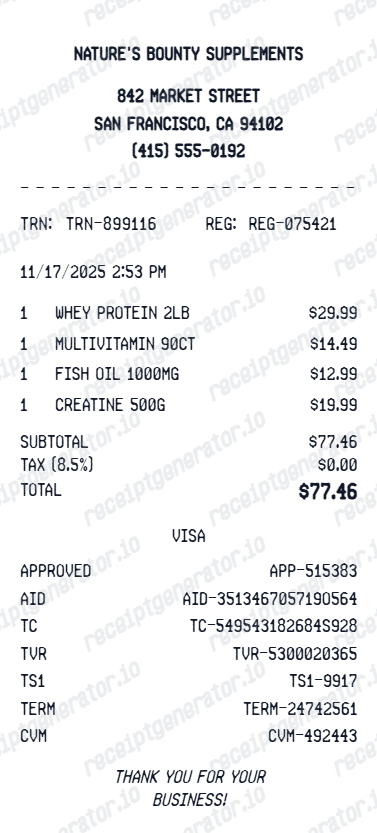
Vitamin and supplement store receipts look like ordinary retail receipts at a glance, but a few details - lot numbers and FSA/HSA eligibility flags - matter more here than at most stores.
Lot number for recall traceability
Supplement retailers often print or can look up the lot number tied to a purchase, since dietary supplements fall under FDA recall and adverse-event reporting rules that trace products back through the lot, not just the SKU.
FSA/HSA eligibility varies by product
Vitamins and supplements are generally NOT FSA/HSA eligible unless recommended by a doctor for a specific medical condition (a Letter of Medical Necessity), while products marketed for a specific ailment (like glucosamine or fiber supplements) are more often accepted without one.
Brand, serving size, and unit count per line
Each product line typically lists the brand, product name, serving size, and container unit count, since supplement pricing and per-serving cost comparisons depend on these details, not just a generic item name.
Loyalty/rewards discount as its own line
Gold Card, myGNC Rewards-style, or store loyalty discounts are itemized as a separate deduction rather than folded into the shelf price, since loyalty pricing differs from the regular retail price.
Sales tax on supplements varies by state
Unlike prescription drugs, over-the-counter vitamins and supplements are taxable in most US states, though a handful exempt them - so the tax line on a supplement receipt is not automatically zero the way a pharmacy Rx line is.
Store name and address for reimbursement
FSA/HSA administrators typically want the store name, address, purchase date, and itemized product names on the receipt - a generic "total only" receipt is usually rejected for eligible-item claims.
Print-ready supplement receipts
Edit the layout, watch it update live, then print, download PDF, or email.
Live supplement receipt preview
Watch the receipt update as you add products and discounts.
One-click print
Print your supplement receipt from the browser.
Download as PDF
Export a clean vitamin receipt PDF for health expense records.
Mobile-friendly editor
Create supplement receipts from any device.
Get Your Original Supplement Receipt First
Most vitamin and supplement retailers keep purchase history tied to a rewards account or email receipt, so check your loyalty app or account order history first. For an in-store purchase without a linked account, the store can often search by payment card and date. Use this template when the original is unavailable - a lost receipt, a closed store, or a purchase made by someone else.
FSA/HSA expense documentation
Document eligible supplement purchases for FSA/HSA reimbursement claims.
Medical expense tracking
Track supplement spending for IRS medical expense deduction records.
Corporate wellness reimbursement
Submit supplement receipts for corporate wellness program reimbursements.
Personal health budget
Monitor monthly supplement spending with itemized supplement receipts.
Supplement Receipt Types
Choose the supplement receipt format for your health product purchase.
Vitamin & Supplement Receipt
Receipt for vitamins, minerals, and dietary supplements.
Protein & Sports Nutrition Receipt
Receipt for protein powder, pre-workout, and sports supplements.
Health Store FSA Receipt
Supplement receipt formatted for FSA/HSA reimbursement documentation.
Related Guides
Explore related guides to understand the receipt details, lookup steps, and documentation workflows.
Receipt guide
Are Supplements Tax-Exempt? A State-by-State Guide
Which states exempt dietary supplements from sales tax and how this affects the tax line on your supplement store receipt.
Explore Are Supplements Tax-Exempt? A State-by-State GuideReceipt guide
Pharmacy Receipt for FSA & HSA
Learn which pharmacy receipt fields matter most for FSA or HSA documentation.
Explore Pharmacy Receipt for FSA & HSAReceipt guide
What a CVS Pharmacy Receipt Should Include
Review the fields that make pharmacy receipt records clearer for reimbursement and health-expense tracking.
Explore What a CVS Pharmacy Receipt Should IncludeReceipt guide
How to Get a CVS Prescription Receipt
See how pharmacy-side receipt retrieval differs from regular store receipt history.
Explore How to Get a CVS Prescription ReceiptMore free receipt templates for pharmacy and retail expense records.




Supplement Receipt FAQ - Vitamin & Health Product Documentation
Learn how to create supplement receipts with product details, loyalty savings, and PDF export for FSA/HSA and health expense documentation.
Choose the supplement receipt template, add store name, supplement products, brand, quantity, discounts, taxes, and payment method. Preview and download as PDF.
Yes. Add Gold Card discount, loyalty savings, or promo code reduction as a line item - totals update automatically.
Some eligible supplements may qualify for FSA/HSA reimbursement - include product name, store address, and total amount paid for documentation.
Yes. Download a clean PDF for FSA/HSA expense tracking, medical expense documentation, or personal health purchase records.
A real supplement receipt shows the store name and address, itemized products with brand, size, and unit count, sales tax (supplements are taxable in most states), any loyalty or rewards discount as a separate line, and the payment total.
Yes. Add supplement name, brand, serving size, units per container, and quantity for complete product documentation.
Yes. Add protein powder, vitamins, pre-workout, and any other supplements as individual line items.
Yes. Add your store name, rewards points earned, and any points redeemed as a receipt summary.
Check the store's loyalty app or online account first, since rewards-linked purchases are usually logged with itemized product names and dates. Without a linked account, contact the store with your payment card and approximate purchase date - many retailers can search register logs for a reprint.
Generally no, unless a doctor provides a Letter of Medical Necessity tying the supplement to a specific condition. Products marketed to treat a diagnosed ailment are more commonly accepted without extra documentation than general multivitamins.
Receipt Generator · Receipt Maker · 300+ Free Templates
Create your Supplement receipt
Use the editable Supplement receipt generator to add items, tax totals, and payment details, then export a clean PDF.