Skip to content

Free UPS Shipping Receipt Generator

Create Free UPS Store Shipping Receipts Online - Add Package Details, Tracking & Fees. Download PDF Instantly.

Create a UPS shipping receipt with tracking, weight, service type, insurance, and payment details. Download a PDF for shipping records or reimbursements.

Choose icon

Choose

UPS Shipping Receipt selected

Customize icon

Customize

Fill in your details

Download icon

Download

Save or share receipt

Customize & PreviewLive sync active

Edit the details once and the preview updates instantly.
Essential fieldsInstant previewPDF-ready layout

Quick summary

UPS Shipping Receipt template overview

Use this UPS Shipping Receipt template to build a clean, editable receipt record with the merchant, date, line items, tax, totals, and payment details already laid out for faster review.

Best for reimbursements, recordkeeping, and internal documentation once the original purchase details are confirmed.
Usually includes the merchant name, purchase date, itemized charges, subtotal, tax, total, and payment method.
Start with the template, then use the related guides below for lookup, reimbursement, or receipt-format questions.

What Is on a Real UPS Shipping Receipt?

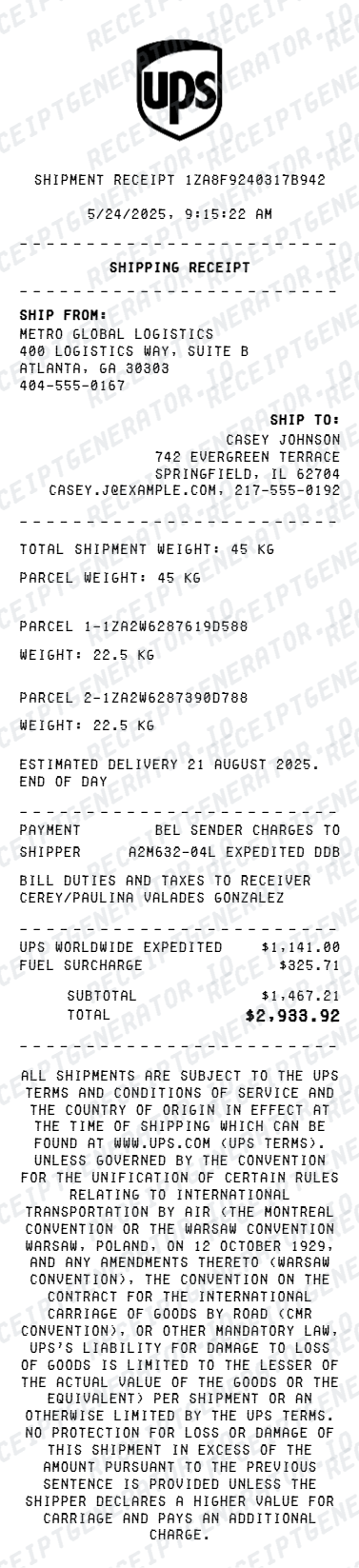
Before you rebuild a UPS receipt, it helps to know what the original contains. UPS receipts anchor everything to the tracking number, and a credible replacement copy should match the real structure field for field.

Tracking number in 1Z format

Domestic UPS packages use an 18-character tracking number starting with 1Z: 1Z, a 6-character shipper account code, a 2-digit service code (03 is Ground), a 7-digit package identifier, and a check digit. On a UPS Store receipt it appears under the Package Information or Tracking Number heading.

Service level and delivery commitment

Real receipts name the exact service - UPS Ground, 3 Day Select, 2nd Day Air, Next Day Air - along with the scheduled delivery date. The 2-digit code inside the tracking number matches the service printed on the receipt.

Declared value line

Every UPS shipment includes $100 of declared value coverage at no charge. If the shipper declared a higher value, the receipt shows the declared amount and the coverage fee as its own line item - a detail insurance claims reviewers look for.

Billable weight, not just actual weight

UPS charges on the greater of actual weight and dimensional weight (length x width x height divided by a divisor). Receipts list the package weight and dimensions used to calculate the billable rate.

Itemized surcharges

Fuel surcharge, residential delivery surcharge, additional handling, and delivery area surcharges print as separate lines rather than being buried in the base rate, so the receipt total rarely equals the published shipping rate.

The UPS Store vs UPS.com receipts

The UPS Store locations are independently owned franchises, so their receipts come from the store's own register and include the store number and address, plus any packing or retail charges. Shipments created on ups.com generate a digital receipt and shipment confirmation email instead.

LIVE PREVIEW

Print-ready UPS shipping receipts

Edit the layout, watch it update live, then print, download PDF, or email.

01

Live UPS receipt preview

Watch the receipt update as you add shipping details and fees.

02

One-click print

Print your UPS shipping receipt from the browser.

03

Download as PDF

Export a clean shipping receipt PDF for expense or billing records.

04

Mobile-friendly editor

Create UPS receipts from any device.

Get Your Original UPS Receipt First

If you shipped through a ups.com account, sign in and open Shipping History to view recent shipment details, or use the UPS Billing Center for formal invoices on account-billed shipments. If you shipped at The UPS Store, contact the same location - each store is an independent franchise that keeps its own transaction records and can often look up a shipment by tracking number. Use this template when the original is unavailable - a guest shipment, a faded thermal receipt, or a drop-off that never had a printed record.

Business shipping expense reimbursement

Document UPS shipment costs for business expense submission.

E-commerce seller records

Create UPS shipping receipts for e-commerce order shipping documentation.

Client billing for shipping

Generate UPS receipts to bill clients for shipping costs.

Insurance claim documentation

Create UPS shipping receipts with declared value for insurance claim submission.

UPS Shipping Receipt Types

Choose the UPS receipt format for your shipment type.

Standard Shipping Receipt

UPS receipt for ground or express package shipment.

International Shipping Receipt

UPS receipt for international package with customs documentation.

Business Account Receipt

UPS receipt for business account shipping with surcharges and fees.

For legitimate recordkeeping only. Generated documents are editable templates, not merchant-issued proof of purchase. Do not use them for false returns, reimbursements, tax claims, or authentication. See the terms of service.

UPS Shipping Receipt FAQ - Shipping Documentation & Expense Records

Learn how to create UPS shipping receipts with tracking details, surcharges, and PDF export for shipping expense and business documentation.

Choose the UPS receipt template, add sender and recipient address, package weight, service type, tracking number, insurance, surcharges, and payment method. Preview and download as PDF.

Yes. Add declared package value and UPS declared value coverage fee as separate line items.

Yes. Download a clean PDF for business shipping expense records, client billing, or customer package documentation.

A real UPS receipt is anchored to an 18-character tracking number starting with 1Z, followed by the service level (Ground, 3 Day Select, 2nd Day Air, Next Day Air), the destination ZIP, the billable weight and dimensions, a declared value line, itemized surcharges like fuel and residential delivery, the total, and the payment method. UPS Store receipts also print the franchise store number and address.

Add the store name, purchase date, line items, totals, tax, payment method, and any optional notes you need on your Free UPS Shipping template.

Yes. Add UPS tracking number, service type (Ground, 2-Day Air, Overnight), and estimated delivery date.

Yes. E-commerce sellers and businesses use UPS receipt templates to document shipment costs for expense reimbursements or customer billing.

If you created the label on ups.com, sign in and open Shipping History to view and print shipment details, or use the UPS Billing Center for invoices on account-billed shipments. If you shipped at The UPS Store, contact the exact store where you shipped - each location is an independent franchise with its own records - and give them the 1Z tracking number. Online label purchases also generate an email receipt worth searching your inbox for.

The UPS Store is a franchise network, so its receipts come from the store's own point of sale - they show the store number, local address, retail charges like packing, and sales tax where applicable. A ups.com receipt is a digital shipment confirmation tied to your UPS account, with the label cost and any account discounts. Expense reviewers accept both, but they look different.

Both. You can use these templates for reimbursements, bookkeeping prep, and internal documentation workflows.

Receipt Generator ยท Receipt Maker ยท 300+ Free Templates

Use the Receipt Generator editor with ready-made templates. Compare pricing or start generating print-ready PDF receipts in your browser no account required.

We use cookies. Privacy Policy.