Wawa Receipt Generator
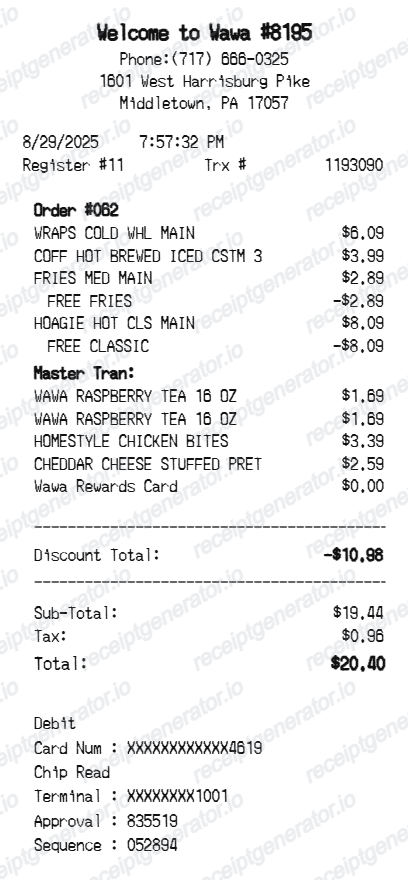
Create a Wawa-style receipt with store details, order lines, rewards discounts, tax, total, and debit payment details.
Create a Wawa receipt with editable store information, itemized food and drink rows, discounts, tax, totals, and payment details. Download a clean PDF quickly.

Choose
Wawa Receipt selected

Customize
Fill in your details

Download
Save or share receipt
Edit the details once and the preview updates instantly.
Quick summary
Wawa receipt template overview
Use this Wawa-style receipt template to build a compact convenience store receipt with editable store details, food and drink order rows, rewards discounts, totals, and debit payment information.
What Is on a Real Wawa Receipt?
Wawa is both a made-to-order deli and a gas station, so its receipts can look different depending on whether the purchase was food, fuel, or a combined trip - and Wawa Rewards adds its own line items.
Separate receipts for food and fuel
Because Wawa operates as a convenience store, deli, and gas station under one roof, a single visit often produces two receipts - one from the register or kiosk for prepared food and drinks, and a separate one from the pump for fuel, since fuel and in-store purchases run through different terminals.
Made-to-order food line items
Hoagies, wraps, and other made-to-order items ring up with build details such as size, bread, and topping modifiers attached to the item line, reflecting Wawa's touchscreen ordering kiosk rather than a fixed menu code.
Wawa Rewards scan-to-earn
Wawa Rewards points are earned by scanning the app or physical rewards card before paying, at the register or the pump - the receipt reflects points earned regardless of whether the customer paid cash, debit, credit, or mobile wallet.
Missed-scan claim window
If a customer forgets to scan their Wawa Rewards app at checkout, Wawa allows submitting the receipt afterward through the app to claim the missed points, typically within a short window of a few days after purchase.
Debit/EBT payment detail lines
In-store payment sections commonly show the card network, a masked card number, entry method (chip or swipe), and terminal/approval codes - standard US point-of-sale fields that appear the same way across Wawa's mid-Atlantic and Florida locations.
State and local tax on prepared food
Because Wawa spans multiple states (Pennsylvania, New Jersey, Delaware, Maryland, Virginia, Florida, and others), the sales tax rate and whether prepared food is taxed at all varies by store location rather than being a single fixed rate chain-wide.
Create a print-ready Wawa receipt
Edit the layout, watch it update live, then print, download PDF, or email.
Live Wawa receipt preview
Watch the receipt update instantly as you edit store text, item rows, discounts, totals, and payment details.
One-click print
Print the Wawa-style receipt directly from the browser.
Download as PDF
Export a clean Wawa receipt PDF in seconds.
Mobile-friendly editor
Create and edit the receipt from desktop or mobile.
Get Your Original Wawa Receipt First
If you scanned your Wawa Rewards app or card at checkout, the transaction and points earned are saved in the app's purchase history - open the Wawa app to view past visits. If you did not scan at the time, Wawa lets you submit the paper receipt through the app within a short window afterward to claim missed points; without the app, ask the store to look up the transaction from the register or pump terminal. Use this template when the original is unavailable - a cash purchase, a faded thermal receipt, or a pump receipt that was never printed.
Convenience store records
Document a Wawa purchase with food, drink, snack, and payment lines.
Receipt mockups
Use the Wawa-style format for examples, demos, or presentation mockups.
Meal expense examples
Create a quick-service food receipt format for internal examples or documentation.
Rewards discount examples
Show reward discounts and adjustments beside regular item prices.
Wawa Receipt Formats
Choose the Wawa-style receipt layout that best matches your food order, convenience store purchase, or payment receipt.
Food Order Receipt
A Wawa-style receipt for hoagies, wraps, fries, coffee, and prepared food purchases.
Convenience Store Receipt
A receipt layout for drinks, snacks, rewards card lines, and general store items.
Debit Payment Receipt
A Wawa-style receipt with detailed debit authorization lines.
Restaurant Receipt Guides
Read supporting guides for restaurant receipts, meal reimbursement, and food expense documentation.
Restaurant Receipt for Reimbursement
See what expense teams require from a food receipt for meal reimbursement approval.
Explore Restaurant Receipt for ReimbursementRestaurant Receipt for Taxes
Review what food receipt fields matter most for business meal tax deductions.
Explore Restaurant Receipt for TaxesRelated Other Receipt Templates
More free receipt templates for restaurants, cafes, fast food, takeout, and convenience store orders.
Wawa Receipt FAQ
Common questions about creating a Wawa-style receipt for records, examples, and mockups.
Choose the Wawa receipt template, edit the store details, date, register, order items, discounts, tax, total, and payment section, then preview and download the receipt as a PDF.
Yes. You can edit subtotal, adjustment rows, tax, and total values so the total section matches the receipt you need.
If you scanned the Wawa Rewards app or card at checkout, open the app and check your purchase history for the transaction. If you did not scan or need the original paper copy, ask the store to look up the transaction at the register, or check the pump terminal reprint option for fuel purchases.
Yes, usually. Wawa allows customers to submit a paper receipt through the Wawa Rewards app after the fact to claim missed points, typically within a short window of a few days from the purchase date.
Both. You can use these templates for reimbursements, bookkeeping prep, and internal documentation workflows.
Yes. You can update prepared food, drinks, snacks, rewards card lines, and prices directly in the receipt builder.
Yes. The payment block is editable, including card type, masked card number, chip read text, terminal, approval, and sequence lines.
A real Wawa receipt shows the store address and register or pump number, made-to-order food items with build modifiers like size and toppings, Wawa Rewards points earned if scanned, subtotal, state and local sales tax (which varies since Wawa spans several states), total, and a debit or credit payment line with a masked card number. Fuel and in-store purchases usually print as separate receipts.
Add the store name, purchase date, line items, totals, tax, payment method, and any optional notes you need on your Wawa template.
This tool creates an editable Wawa style layout for documentation. It is not issued by the original merchant or brand system.
Receipt Generator · Receipt Maker · 300+ Free Templates
Create your Wawa receipt
Use the editable Wawa receipt generator to add store details, food and drink order rows, rewards discounts, totals, and payment information, then export a clean PDF.