KFC Receipt Generator
Create a KFC-style receipt with store details, chicken bucket and side item rows, tax, total, Colonel's Club rewards footer, and card or cash payment. Preview live and export a PDF.
Create a KFC-style receipt with editable store details, bucket meal and side item rows, tax, total, and payment information. Download a clean PDF for meal records or expense documentation.

Choose
KFC Receipt selected

Customize
Fill in your details

Download
Save or share receipt
Edit the details once and the preview updates instantly.
Quick summary
KFC receipt template overview
Use this KFC-style receipt template to build a complete fast food receipt with store details, chicken and side item rows, combo lines, subtotal, tax, payment summary, and loyalty footer.
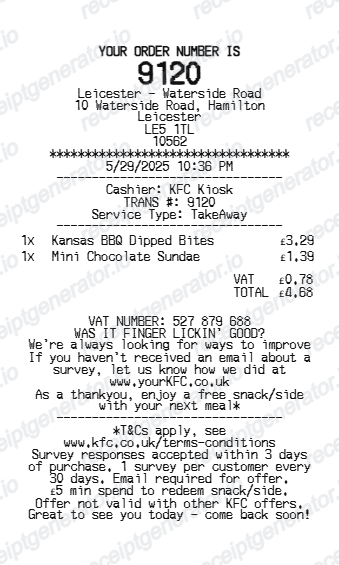
What Is on a Real KFC Receipt?
A US KFC receipt is built around a franchise store number and register ID rather than a single national format, since each location runs its own POS terminal under the KFC US franchise system.
Store number and register/order ID
The header shows the restaurant address followed by a store number, a register (till) number, and an order number - the combination a location uses to look up a transaction if a customer disputes an order.
Bucket, combo, and side item rows
Original Recipe and Extra Crispy pieces, popcorn chicken, mashed potatoes, coleslaw, biscuits, and drinks print as individual lines, with combo/bucket meals showing indented modifier lines for included sides or upsizes.
Local sales tax, not a flat federal rate
Tax is calculated from the store's local city/county/state sales tax rate rather than one national rate, so the same order can show different tax lines at different KFC locations.
KFC Rewards points line
Signed-in app orders earn about 10 points per eligible dollar spent, shown in the app's order history; if the loyalty QR code was not scanned in-store, the app's Scan Receipt tool lets customers add points manually within about 7 days of purchase.
Payment breakdown
The bottom of the receipt shows subtotal, tax, total, and payment method - card with masked digits and an approval code, or cash with the amount tendered and change due.
PDF-ready export
Download or print a clean KFC-style receipt for meal expense records, reimbursement, or documentation.
Create a print-ready KFC receipt
Edit the layout, watch it update live, then print, download PDF, or email.
Live KFC receipt preview
Watch the receipt update instantly as you edit store details, item rows, modifier lines, totals, and payment information.
Editable receipt sections
Update store header, order number, chicken and side item rows, totals, payment details, and Colonel's Club footer.
Download as PDF
Export a clean KFC-style receipt PDF when your order details are ready.
Mobile-friendly editor
Create, preview, and revise the KFC receipt from desktop or mobile.
Get Your Original KFC Receipt First
If you ordered through the KFC US app or KFC.com while signed in, the receipt and points earned are saved under Order History and can be reopened from there. For an in-store order where the loyalty QR was not scanned, the app's Scan Receipt tool under the Loyalty tab lets you add points manually within about 7 days of purchase, which also confirms the order details. Use this template when the original is unavailable - a lost paper receipt or a purchase made without the app.
Meal expense records
Document a KFC order with chicken and side details, tax, total, and payment information for expense records.
Lost receipt recovery
Recreate a KFC receipt when the original was not printed or was misplaced after the transaction.
Receipt mockups
Use the KFC-style layout for demos, training materials, or presentation mockups.
Business meal documentation
Create a clean fast food receipt for team lunch or individual meal expense reporting.
KFC Receipt Formats
Choose the KFC-style receipt layout that best matches your bucket meal, combo order, or loyalty receipt needs.
KFC Bucket Meal Receipt
A KFC-style receipt with bucket meal rows, side items, tax, and payment summary.
Combo Meal Receipt
A receipt showing chicken pieces, sides, drink, and dessert rows with individual prices and totals.
Colonel's Club Rewards Receipt
A KFC receipt with loyalty points text and Colonel's Club rewards footer messaging.
Restaurant Receipt Guides
Read supporting guides for restaurant receipts, meal reimbursement, and fast food expense documentation.
Editable template
Restaurant Receipt Generator template
Explore this editable receipt layout and its fields before opening the editor.
Explore Restaurant Receipt Generator templateReceipt guide
Restaurant Receipt for Taxes
Review what fast food receipt fields matter most for business meal tax deductions.
Explore Restaurant Receipt for TaxesMore free receipt templates for fried chicken, fast food, and restaurant meal expense records.
KFC Receipt FAQ
Common questions about creating, editing, and downloading a KFC-style receipt for meal records, expense documentation, and receipt examples.
Open the KFC receipt generator, edit the store details, order date, chicken and side item rows, subtotal, tax, total, and payment section, then preview and download the receipt as a PDF.
Yes. Each item row supports indented modifier lines for combo details, special instructions, or meal component notes.
Yes. The payment section supports card payment with masked card details and approval code, or cash payment with cash tendered and change due.
A real KFC receipt shows the restaurant address, a store number, register number, and order number, item rows for buckets, combos, and sides with modifier lines, subtotal and local sales tax, the total, and the payment method with masked card digits or cash change due.
Yes. Add Original Recipe, Extra Crispy, popcorn chicken, mashed potatoes, coleslaw, biscuits, drinks, and any other items with quantities and prices.
Yes. The receipt footer supports editable loyalty text so you can add Colonel's Club points, member number, or promotional messaging.
Orders placed through the KFC US app or KFC.com while signed in are saved under Order History and can be reopened from there. For an in-store order where the loyalty QR was not scanned, the app's Scan Receipt tool under the Loyalty tab lets you enter receipt details within about 7 days of purchase to add the order to your account.
A KFC receipt can support a business meal expense claim, but most tax authorities also want the business purpose and attendees noted separately, since the receipt itself only documents the purchase, not the reason for it.
Receipt Generator · Receipt Maker · 300+ Free Templates
Create your KFC receipt
Use the editable KFC receipt generator to add chicken and side item rows, totals, and payment details, then export a clean PDF for your records.