Panera Bread Receipt Generator
Create a Panera Bread-style receipt with store details, order rows, extra items, totals, MyPanera message, code, and POS footer.
Create a Panera Bread-style receipt with editable store information, order details, item rows, extra item modifiers, cash totals, and footer text. Download a clean PDF quickly.

Choose
Panera Bread Receipt selected

Customize
Fill in your details

Download
Save or share receipt
Edit the details once and the preview updates instantly.
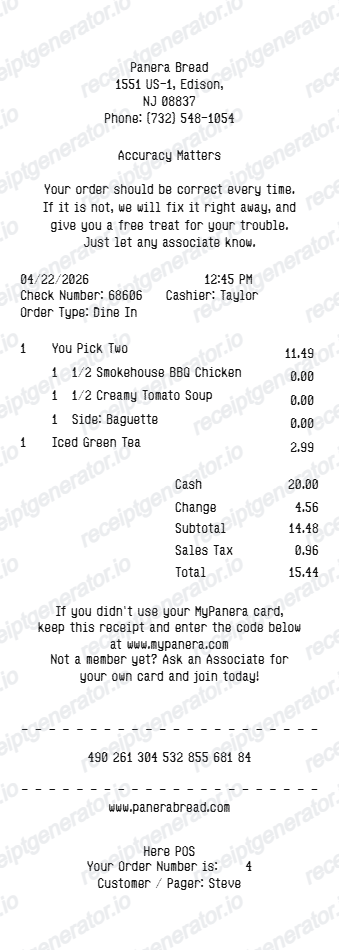
Quick summary
Panera Bread receipt template overview
Use this Panera Bread-style receipt template to build a compact cafe receipt with editable store details, order rows, extra item modifiers, totals, MyPanera message, and POS footer.
What Is on a Real Panera Bread Receipt?
Before you rebuild a Panera receipt, it helps to know what the original includes. Panera receipts follow a consistent cafe layout, and a credible replacement copy should match its structure line for line.
MyPanera is a points-based rewards program, not simple cashback
In 2026 Panera began rolling its MyPanera loyalty program to a points system where members earn 10 points per $1 spent, redeemable for bakery items, sides, sandwiches, or salads. The legacy version used personalized surprise rewards - unlocked offers based on visit frequency and ordering patterns - rather than a flat discount, so a receipt may show a points balance or a surprise-reward message depending on when the order was placed.
Rapid Pick-Up orders carry a pickup code
Online and app orders placed for Rapid Pick-Up print a short order code (letters and numbers) that matches the label on the pickup shelf bag, so the receipt and the bag tag correspond to the same code.
Extra item lines are indented under the main order row
Modifiers like dressing on the side, bread substitutions, or added toppings print as indented lines directly beneath the sandwich, salad, or soup they belong to, not as separate standalone items.
Order confirmation email doubles as the digital receipt
For online, app, and Rapid Pick-Up orders, Panera sends an email confirmation to the address on file (or the address entered at checkout for guest orders) that lists the same items, totals, and order details as the printed receipt.
Totals section with cash and change fields
In-cafe receipts show subtotal, sales tax, and total, followed by cash tendered and change due when paid with cash, or a masked card number when paid by card.
Printed code and survey footer
Most Panera receipts end with a short printed code tied to the transaction and footer text referencing Panera's customer feedback channel, positioned below the MyPanera messaging.
Create a print-ready Panera Bread receipt
Edit the layout, watch it update live, then print, download PDF, or email.
Live Panera receipt preview
Watch the receipt update instantly as you edit store text, order rows, extra items, totals, and footer details.
One-click print
Print the Panera Bread-style receipt directly from the browser.
Download as PDF
Export a clean Panera receipt PDF in seconds.
Mobile-friendly editor
Create and edit the receipt from desktop or mobile.
Get Your Original Panera Bread Receipt First
If you ordered online, through the app, or picked a Rapid Pick-Up slot while signed in to MyPanera, check your email for the order confirmation or open order history in the app - that is Panera's official digital receipt. For in-cafe purchases, ask staff for a reprint using the printed survey code from your original ticket. Use this template when the original is unavailable - a missed email, a closed guest checkout, or a paper receipt that was thrown away.
Fast casual order records
Document a Panera-style food order with item lines, modifiers, totals, and payment details.
Receipt mockups
Use the Panera Bread-style format for examples, demos, or presentation mockups.
Meal expense examples
Create a cafe or fast casual restaurant receipt format for internal examples or documentation.
Bundled order examples
Show sandwiches, salads, soups, sides, and extra item lines in a compact receipt.
Panera Bread Receipt Formats
Choose the Panera Bread-style receipt layout that best matches your cafe, bakery, sandwich, soup, or salad order.
Fast Casual Receipt
A Panera Bread-style receipt for cafe, bakery, soup, salad, and sandwich orders.
Itemized Food Receipt
A compact receipt showing main food items, extra item lines, subtotal, tax, and total.
Cash Payment Receipt
A Panera-style receipt with cash paid and change fields.
Restaurant Receipt Guides
Read supporting guides for restaurant receipts, meal reimbursement, and cafe expense documentation.
Restaurant Receipt for Reimbursement
See what expense teams require from a cafe or restaurant receipt for meal reimbursement.
Explore Restaurant Receipt for ReimbursementRestaurant Receipt for Taxes
Review the restaurant receipt fields that matter most for business meal documentation.
Explore Restaurant Receipt for TaxesRelated Other Receipt Templates
More free receipt templates for cafes, fast casual restaurants, takeout, and food orders.
Panera Bread Receipt FAQ
Common questions about creating, editing, and downloading a Panera Bread-style receipt.
Choose the Panera Bread receipt template, edit the store details, order date, item rows, extra items, totals, and footer text, then preview and download the receipt as a PDF.
Yes. You can edit subtotal, sales tax, total, cash, and change fields so the receipt matches the details you need.
If you ordered while signed in to your MyPanera account, or entered your email at checkout, Panera sends an order confirmation email that serves as your receipt - check your inbox or the order history in the Panera app. For in-cafe purchases, ask the cashier for a reprint, or use the receipt survey code printed at the bottom to look up the transaction.
Yes. Panera receipts are commonly submitted for business meal reimbursement, catering expense reports, and team lunch documentation. Keep the itemized version showing date, items, and total rather than just the payment confirmation.
Both. You can use these templates for reimbursements, bookkeeping prep, and internal documentation workflows.
Yes. The MyPanera card message, web address, printed code, and POS footer are editable in the receipt builder.
Yes. You can download or print a clean Panera Bread-style receipt PDF directly from the generator.
A real Panera receipt shows the cafe address and phone number, the order date and time, each item on its own line with any extra or modifier lines indented underneath (like dressing on the side or bread substitutions), subtotal, sales tax, total, the payment method, and a MyPanera loyalty message with a printed code near the footer.
Add the store name, purchase date, line items, totals, tax, payment method, and any optional notes you need on your Panera Bread template.
This tool creates an editable Panera Bread style layout for documentation. It is not issued by the original merchant or brand system.
Receipt Generator · Receipt Maker · 300+ Free Templates
Create your Panera Bread receipt
Use the editable Panera Bread receipt generator to add order rows, extra items, totals, MyPanera details, and POS footer, then export a clean PDF.