Taco Bell Receipt Generator
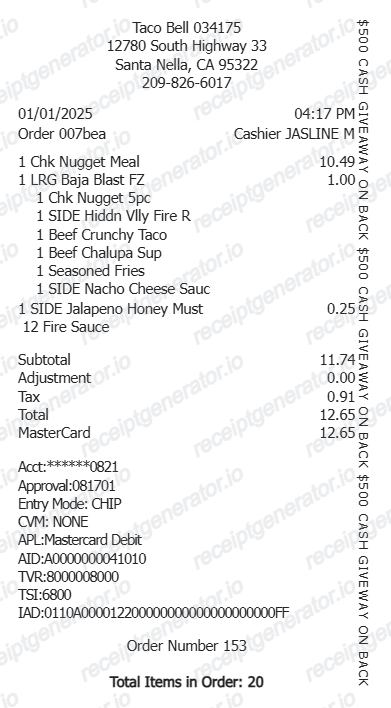
Create a Taco Bell-style receipt with editable store details, item rows, subtotal, tax, adjustments, payment details, footer item count, and vertical side banner. Preview and download as PDF.
Create a Taco Bell-style receipt with editable transaction details, itemized rows, totals, adjustments, card or cash payment details, and a print-ready narrow receipt layout.

Choose
Taco Bell Receipt selected

Customize
Fill in your details

Download
Save or share receipt
Edit the details once and the preview updates instantly.
Quick summary
Taco Bell receipt template overview
Use this Taco Bell-style receipt template to build a narrow thermal receipt with editable store details, itemized order rows, totals, adjustments, card or cash payment, and side banner.
What Is on a Real Taco Bell Receipt?
A genuine Taco Bell receipt follows a fairly fixed thermal-printer layout, and a credible replacement copy should match its structure and fields.
Store number and order number
Every Taco Bell location prints a store number near the header, along with an order or ticket number for that transaction. These numbers are what staff use to look up a specific order if there is a dispute or refund.
4-digit Rewards code at the bottom
Receipts from company-run locations print a 4-digit code near the bottom of the slip. Customers who forgot to scan the app at checkout can open the Taco Bell app, go to Add Points, and enter this code within 5 days of purchase to still earn Rewards points.
10 points per $1 spent
Taco Bell Rewards earns roughly 10 points per dollar on qualifying purchases. Points from in-app mobile orders post automatically, while orders through third-party delivery apps typically do not earn points at all.
Mobile order pickup details
Orders placed through the Taco Bell app show a mobile order flag and a designated pickup slot or counter label on the receipt, separate from the drive-thru or front-counter ticket format.
Itemized rows with modifiers
Each menu item prints with its price, and customizations (extra sauce, no onions, substitutions) appear as indented sub-lines directly under the item.
Card or cash payment section
Card payments show the entry method, masked card number, and approval details; cash payments show the amount tendered and change due instead.
Create a print-ready Taco Bell receipt
Edit the layout, watch it update live, then print, download PDF, or email.
Live Taco Bell receipt preview
Watch the receipt update instantly as you edit store, item, total, payment, and side banner details.
Editable receipt sections
Update store information, transaction details, items, totals, payment lines, footer text, and side banner copy.
Download as PDF
Export a clean Taco Bell-style receipt PDF after reviewing the generated preview.
Mobile-friendly editor
Create, preview, and revise the receipt from desktop or mobile.
Get Your Original Taco Bell Receipt First
If you paid with the Taco Bell app or a card, open the app's order history or check your card statement for the exact total. In-store paper receipts print a 4-digit code you can enter under Add Points within 5 days to claim missed Rewards. Use this template when the original is unavailable - a discarded paper slip, a cash order, or a receipt request after the 5-day Rewards window has closed.
Fast food purchase records
Document a Taco Bell order with item details, tax, total, and payment information.
Meal expense records
Prepare a clear fast food receipt layout for meal or travel expense documentation.
Receipt mockups
Use the Taco Bell-style layout for demos, previews, sample data, and presentation mockups.
Printable receipt examples
Create a receipt example with store details, item count, payment details, and a narrow thermal layout.
Taco Bell Receipt Formats
Choose the Taco Bell-style receipt layout that matches your order record or mockup.
Itemized Food Receipt
A Taco Bell-style receipt with quantities, item names, prices, subtotal, tax, and total.
Card Payment Receipt
A receipt format with account, approval, entry mode, card application, AID, TVR, TSI, and IAD lines.
Cash Receipt
A Taco Bell-style receipt that shows cash tendered and automatically calculated change.
Restaurant Receipt Guides
Read supporting guides for restaurant receipts, meal reimbursement, and fast food documentation.
Restaurant Receipt for Reimbursement
See what expense teams require from a restaurant receipt for meal reimbursement approval.
Explore Restaurant Receipt for ReimbursementRestaurant Receipt for Taxes
Review what fast food receipt fields matter most for business meal tax deductions.
Explore Restaurant Receipt for TaxesRelated Other Receipt Templates
More free receipt templates for fast food, restaurants, and meal expense documentation.
Taco Bell Receipt FAQ
Common questions about creating and editing a Taco Bell-style receipt.
Open the Taco Bell receipt generator, edit the store details, transaction date, item rows, totals, adjustments, payment details, and footer, then preview and download the receipt as a PDF.
Yes. The totals section supports plus and minus adjustment rows so you can add fees or subtract discounts before the final total.
For app or card orders, check the Taco Bell app's order history or your card statement for the total. For a missed Rewards code, open the app within 5 days of purchase, go to Add Points, and enter the 4-digit code printed near the bottom of the paper receipt. Taco Bell locations generally do not keep or reprint old paper receipts.
Yes, but only within 5 days of purchase. Enter the 4-digit code from the paper receipt in the Taco Bell app under Add Points. Orders placed through third-party delivery apps do not earn Rewards points regardless of the receipt.
Both. You can use these templates for reimbursements, bookkeeping prep, and internal documentation workflows.
Yes. You can add, remove, and edit item lines, quantities, prices, and indented item rows in the builder.
Yes. You can preview the Taco Bell-style receipt and export a clean printable PDF when your details are ready.
A real Taco Bell receipt shows the store number and order number near the header, itemized menu items with any modifier sub-lines, subtotal, tax, and total, a card or cash payment section, and a 4-digit Rewards code near the bottom on in-store printed receipts.
Add the store name, purchase date, line items, totals, tax, payment method, and any optional notes you need on your Taco Bell template.
This tool creates an editable Taco Bell style layout for documentation. It is not issued by the original merchant or brand system.
Receipt Generator · Receipt Maker · 300+ Free Templates
Create your Taco Bell receipt
Use the editable Taco Bell receipt generator to add order details, item rows, totals, payment information, and side banner text, then export a clean PDF.