The Gourmet Bistro Receipt Generator
Create a fine dining receipt for The Gourmet Bistro with itemized courses, server details, tax, and payment. Download a PDF for dining records or client billing.
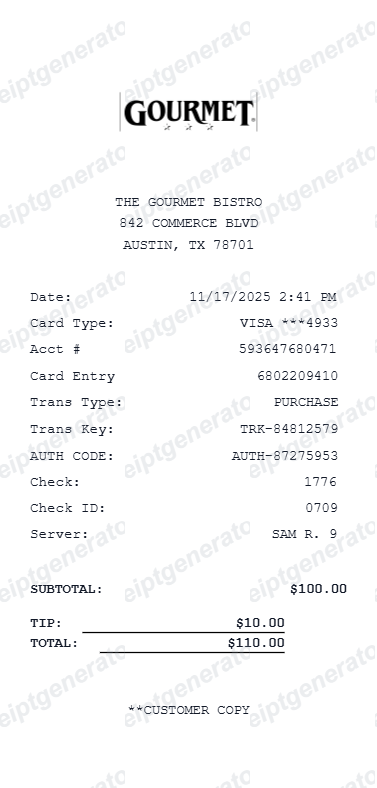
Generate professional receipts for The Gourmet Bistro in Austin, TX. Features include itemized dining, server details, and transaction info.

Choose
The Gourmet Bistro selected

Customize
Fill in your details

Download
Save or share receipt
Edit the details once and the preview updates instantly.
Quick summary
The Gourmet Bistro receipt template overview
Use this The Gourmet Bistro receipt generator to create authentic itemized receipts with editable products, tax calculations in $, and printable PDF export.
What Is on a Real Upscale Bistro Receipt?
Fine dining checks differ from casual restaurant tickets in a few concrete ways - course structure, wine pricing, and gratuity handling all show up as distinct line items.
Prix-fixe menu priced as one line
A tasting or prix-fixe menu is usually rung in as a single line item (for example 'Chef's Tasting Menu - 5 Course') with per-guest pricing, rather than itemizing each course separately. Optional supplements like a caviar or foie gras course appear as add-on lines beneath it.
Wine priced at 2-3x bottle cost
Restaurants commonly price wine at two to three times their wholesale cost, so a bottle on the check often looks expensive relative to retail. Wine pairings for a tasting menu are typically shown as a separate add-on line rather than folded into the food total.
Corkage fee as a distinct line
When a guest brings their own bottle, the corkage fee (commonly $10-$50, higher at high-end big-city restaurants) is printed as its own line item rather than bundled with the wine total.
Server, check, and table identifiers
Fine dining checks typically print the server name or number, a check/ticket ID, table and guest count, and open/close timestamps - details casual receipts often omit.
Suggested gratuity tiers
Many upscale restaurants print two or three suggested tip percentages (often 18%, 20%, 22%) with the pre-calculated dollar amount for each, rather than a blank tip line.
Card authorization detail
The payment section usually shows card entry method (chip, tap, or swipe), an authorization code, and the last four digits of the card - useful for matching a check against a corporate card statement.
Precision Receipt Generation
Edit the layout, watch it update live, then print, download PDF, or email.
Live preview
See your changes instantly as you edit transaction details.
PDF Download
Export a high-resolution PDF suitable for expense reports.
Custom tip lines
Easily add tip and final total lines for accurate billing.
Get Your Original The Gourmet Bistro Receipt First
Most upscale restaurants can reprint a check if you ask the manager and provide the visit date, table, or the card used - many point-of-sale systems (Toast, Micros, Aloha) keep searchable transaction history for months. If the restaurant already closed the check or you cannot reach them, use this template when the original is unavailable - to recreate a fine dining receipt for expense or tax records.
Expense & reimbursement documentation
Document The Gourmet Bistro purchases with itemized totals and tax lines for personal budgeting or expense reimbursement.
Lost receipt replacement
Recreate a clean itemized receipt record from transaction details when original thermal till slips are lost or faded.
Warranty & purchase recordkeeping
Maintain verifiable purchase documentation with date, time, and register references for inventory and record tracking.
Available Formats
Choose the receipt style that fits your reporting needs.
Standard Store Receipt
Standard The Gourmet Bistro till receipt layout with item lines, subtotals, tax breakdown, and payment confirmation.
Itemized Detailed Receipt
Expanded layout with product SKU codes, quantity unit rates, discounts, and store register metadata.
Digital Order & Invoice
Clean electronic invoice format with customer reference numbers, transaction IDs, and payment method details in $.
Related Guides
Explore related guides to understand the receipt details, lookup steps, and documentation workflows.
Related Other Receipt Templates
More free receipt templates for restaurant and retail expense records.




The Gourmet Bistro FAQ
Frequently asked questions about The Gourmet Bistro receipt generator
Yes, The Gourmet Bistro template includes fields for server name, check ID, and table details for authentic record keeping.
Absolutely. While it defaults to the Commerce Blvd location, you can edit the business name and address lines as needed.
A real upscale bistro receipt shows the server name or number, a check/table ID, itemized courses or a single prix-fixe line, wine priced well above retail, any corkage fee as its own line, suggested gratuity amounts at a few percentages, tax, and a card authorization code with the last four digits.
Add the store name, purchase date, line items, totals, tax, payment method, and any optional notes you need on your The Gourmet Bistro template.
This tool creates an editable The Gourmet Bistro style layout for documentation. It is not issued by the original merchant or brand system.
Yes, you can customize card type, last four digits, authorization codes, and transaction keys.
Contact the restaurant directly with your visit date, approximate time, table, or the card used to pay - most point-of-sale systems can look up and reprint a closed check for several months after the visit. Some restaurants also email a digital receipt at checkout if you provided an email address.
Yes, in most cases - keep the itemized receipt showing the date, restaurant name, amount, and, for US business deductions, note the business purpose and attendees. The IRS generally requires records for meal expenses over $75, though it is good practice to keep every receipt.
Both. You can use these templates for reimbursements, bookkeeping prep, and internal documentation workflows.
Yes. The generator works on mobile and desktop so you can edit details, preview changes, and export from either device.
Receipt Generator · Receipt Maker · 300+ Free Templates
Create your The Gourmet Bistro receipt
Use the editable The Gourmet Bistro receipt generator to add items, tax totals, and payment details, then export a clean PDF.