Optical Eyewear Prescription Receipt Generator
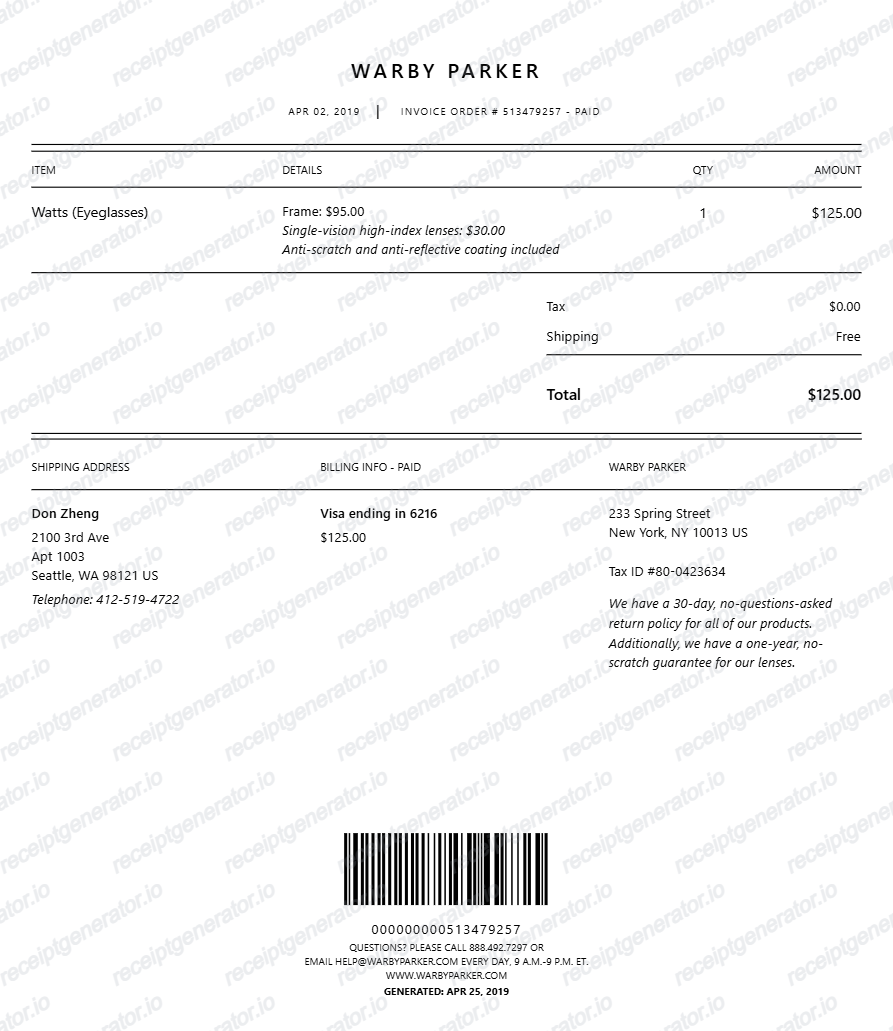
Create a clean optical eyewear prescription receipt with item details, tax, shipping, and barcode footer. Export PDF instantly.
Generate an optical eyewear prescription receipt online with customer details, billing info, itemized lens/frame lines, tax and shipping totals, and barcode section. Download a print-ready PDF for documentation, reimbursement support, and design mockups.

Choose
Optical Eyewear Prescription Receipt selected

Customize
Fill in your details

Download
Save or share receipt
Edit the details once and the preview updates instantly.
Quick summary
Optical Eyewear Prescription receipt template overview
Use this Optical Eyewear Prescription receipt generator to create authentic itemized receipts with editable products, tax calculations in $, and printable PDF export.
What Is on a Real Optical Eyewear Prescription Receipt?
Optical receipts combine a retail itemization with clinical prescription notation, so they follow a stricter structure than a typical store receipt.
OD/OS prescription grid
The prescription is printed as a small grid with OD (right eye) and OS (left eye) rows, each carrying sphere, cylinder, axis, and add power values, plus a PD (pupillary distance) measurement used to fit the lenses.
Frame and lens itemized separately
Real receipts list the frame as one line (brand, model, color/size) and the lenses as a separate line, since they are billed and warrantied independently. Add-ons like coatings are their own lines rather than bundled into the lens price.
Coating and upgrade line items
Anti-reflective coating, blue-light filtering, photochromic (transition) tint, and high-index lens material each appear as separate charges, since each has its own price and is optional.
FSA/HSA vision eligibility
Prescription eyeglasses, contact lenses, and eye exams are FSA/HSA eligible under IRS Publication 502, but non-prescription reading glasses and cosmetic tints may need extra documentation. Receipts used for FSA/HSA claims typically need the patient name, provider name, and a description that ties the charge to vision correction.
Insurance vision-benefit line
When a vision plan like VSP or EyeMed is applied, the receipt shows the plan allowance or discount as its own line, separate from the patient's out-of-pocket balance, so the remaining FSA/HSA-eligible amount is clear.
Return and warranty window
Optical retailers commonly print a 30 to 90 day adjustment or warranty period on the receipt, since prescription changes and frame defects need a documented purchase date to process.
Create a print-ready optical prescription receipt
Edit the layout, watch it update live, then print, download PDF, or email.
Live preview editing
See receipt updates instantly while editing fields.
Section-based controls
Adjust logo/header, items, summary, shipping, and footer sections independently.
Print and PDF export
Generate clean, printable output with one click.
Desktop and mobile editing
Build the receipt from either desktop or mobile device.
Get Your Original Optical Receipt First
Most optical retailers keep purchase history tied to your account or phone number, so the fastest path is to call or visit the store and ask for a reprint - many can also email a PDF copy on request. If you used vision insurance, your VSP or EyeMed member portal usually has a claim history with the amount paid. Use this template when the original is unavailable - a closed store, a paper-only receipt that was lost, or a purchase made by someone else.
Optical store billing
Prepare clear eyewear purchase receipts with itemized details.
Expense documentation
Use structured receipt output for reimbursement and expense records.
Design and product demos
Show a realistic optical receipt layout in demos or QA workflows.
Personal recordkeeping
Keep organized copies of eyewear purchase and payment details.
Optical Receipt Formats
Choose the optical receipt format that fits your billing and documentation workflow.
Single-item Eyewear Receipt
A focused layout for one frame/lens purchase.
Detailed Lens and Coating Receipt
Show separate lines for frame, lens type, and coating details.
Barcode-ready Optical Receipt
Include barcode value and footer support for receipt verification style.
Related Guides
Explore related guides to understand the receipt details, lookup steps, and documentation workflows.
Pharmacy Receipt for FSA & HSA
Learn which eyewear and prescription receipt fields qualify for FSA or HSA reimbursement documentation.
Explore Pharmacy Receipt for FSA & HSAWhat a CVS Pharmacy Receipt Should Include
Review the receipt fields that make optical and pharmacy purchase records clearer for health-expense reimbursement.
Explore What a CVS Pharmacy Receipt Should IncludeHow to Get a CVS Prescription Receipt
See how pharmacy-side receipt retrieval differs from regular store receipt history.
Explore How to Get a CVS Prescription ReceiptRelated Other Receipt Templates
More free receipt templates for pharmacy and retail expense records.

Optical Eyewear Prescription Receipt FAQ
Common questions about creating and exporting optical eyewear prescription receipts.
Choose the optical eyewear template, fill customer and billing details, add frame and lens lines, review totals, then export the receipt as a PDF.
Yes. The footer includes editable barcode value, height, width percentage, and bar width controls.
Yes. You can export a clean, print-ready PDF from the generator.
A real optical receipt shows the OD/OS prescription grid with sphere, cylinder, axis, add, and PD values, separate line items for the frame and lenses, any coating or upgrade charges, the insurance vision-benefit allowance if used, and the out-of-pocket total.
Add the store name, purchase date, line items, totals, tax, payment method, and any optional notes you need on your Optical Eyewear Prescription template.
Yes. You can set tax from settings, configure shipping, and add custom plus or minus amount rows in the summary section.
Yes. This template works well for optical billing references, expense documentation, and UI/layout mockups.
Contact the store directly with your name or phone number - most optical retailers keep purchase records tied to the customer profile and can reprint or email the original receipt. If vision insurance was used, the VSP or EyeMed member portal also shows a claim history with dates and amounts paid.
Yes. Prescription eyeglasses, contact lenses, and eye exams are FSA/HSA eligible under IRS rules regardless of whether vision insurance was used - the receipt just needs to show the patient name, item description, and amount paid out of pocket.
Both. You can use these templates for reimbursements, bookkeeping prep, and internal documentation workflows.
Receipt Generator · Receipt Maker · 300+ Free Templates
Create your Optical Eyewear Prescription receipt
Use the editable Optical Eyewear Prescription receipt generator to add items, tax totals, and payment details, then export a clean PDF.